
Connecting Your Ad Accounts
Why connect an ad account?
Connecting your Meta Ad account to Skaler unlocks the Analytics dashboard, where you can track performance metrics like ROAS, CPA, spend, and more — all in one place.
How to connect
- Navigate to Analytics from the Navigation Rail.
- Click Connect Meta Ad Account.
- You'll be redirected to Facebook to authorize Skaler. Log in with the Facebook account that has access to your ad accounts.
- Grant the requested permissions.
- After authorization, you'll see a list of available ad accounts — select the one you want to connect and click Connect.
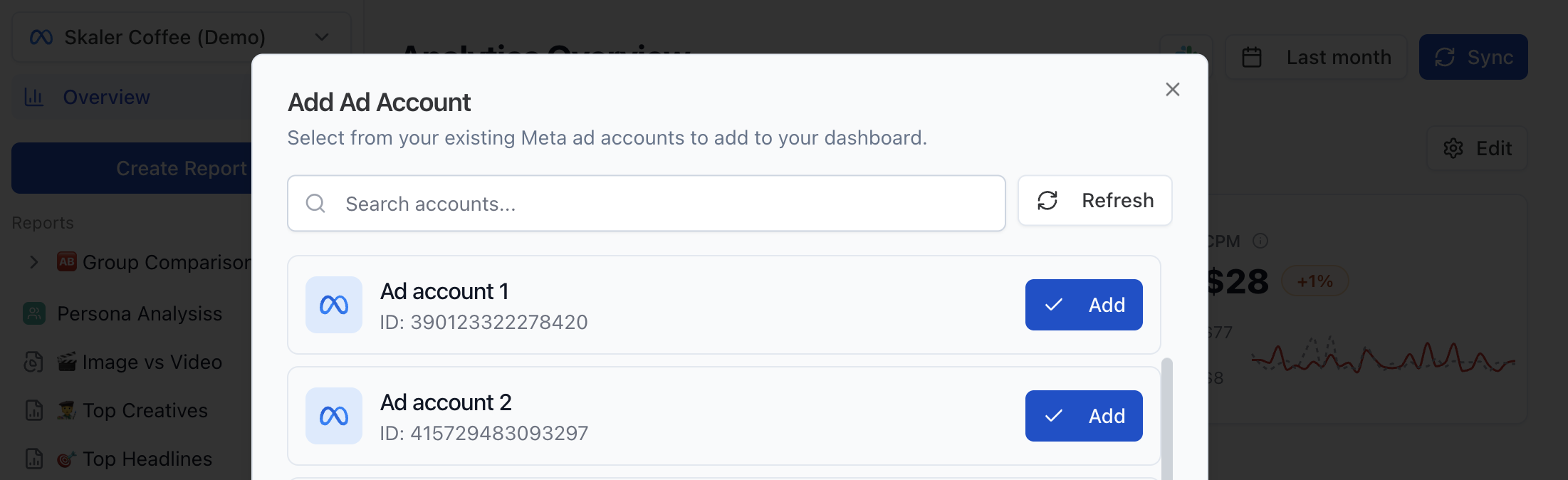
You can search accounts by name or ID if you manage many ad accounts.
Permissions
During authorization, Facebook will ask you to grant Skaler access to your ad accounts and pages. Make sure to allow access to the Facebook/Instagram pages that your ads are running from — otherwise Skaler won't be able to load video creatives and some ad previews.
Skaler only reads your data. We never modify your campaigns, ad sets, or ads.
Managing connections
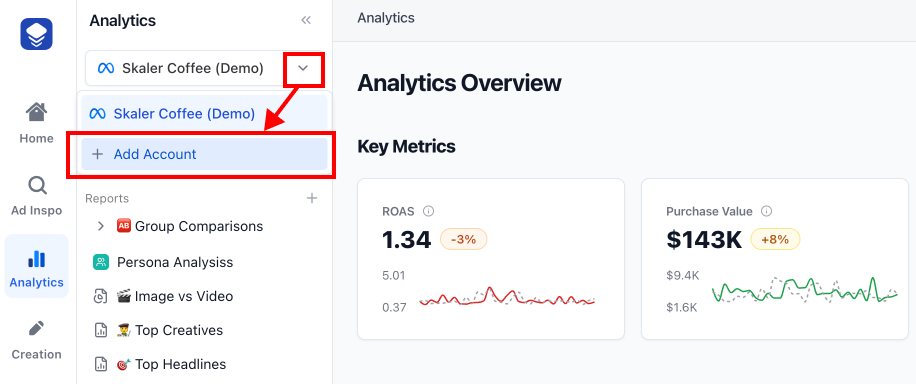
- Switch between connected accounts using the Account Selector at the top of the Analytics sidebar.
- Add another account by clicking Add Account in the account selector dropdown.
- Disconnect an account from its settings.
Troubleshooting
- Token expired — If you see an "Access Token Expired" alert, click Refresh Token to re-authorize.
- Account not visible — Make sure you have admin or analyst access to the ad account on Facebook, then try connecting a new business account.
- Authorization failed — Try clearing your browser cookies and connecting again.