
How to Connect the Official Meta Ads MCP to Claude (5-Minute Setup, 2026)
Step-by-step guide to connecting Meta's official Ads MCP server to Claude in under 5 minutes, plus the beta limitations (1-of-20 ad accounts, Meta-only) and what to use when you hit them.

 Follow on LinkedIn
TL;DR: On April 29, 2026, Meta released Ads AI Connectors in open beta, including an official MCP server at https://mcp.facebook.com/ads. To connect it to Claude, open Claude, go to + → Connectors → Add connector, paste the URL, name it Meta MCP, click Connect, authenticate with Facebook, and restart Claude. The catch: in the open beta most advertisers only get a handful of their ad accounts whitelisted, several tools fail silently, and the connector is Meta-only (no TikTok, Google, or Snap).
For the past few weeks, anyone bridging Claude or ChatGPT to a Facebook ad account through a third-party MCP was risking a ban. Meta's own connector kills that risk: real OAuth, no developer credentials, no API setup, no claude_desktop_config.json editing. Below is the fastest path from zero to a working Meta Ads MCP, in Claude and in ChatGPT, plus what to do when the rollout hasn't caught up to your accounts yet.
How do you connect the Meta Ads MCP to Claude?
To connect the Meta Ads MCP to Claude, copy the URL https://mcp.facebook.com/ads, open Claude, click the + icon in the prompt bar, hover Connectors, click + Add connector, paste the URL, name it Meta MCP, hit Add, then click Connect on the new connector card and complete the Facebook OAuth flow. Restart Claude after authentication so the new tools load. End to end it takes about five minutes.
Step by step:
1. Copy the official MCP server URL
Meta publishes the URL inside the Ads AI Connectors help article. The remote MCP server URL is:
https://mcp.facebook.com/ads
That's it. There is no npm install, no token, no JSON config file. If a setup guide tells you to paste an npx command into claude_desktop_config.json, you're looking at a third-party MCP, not the official one.
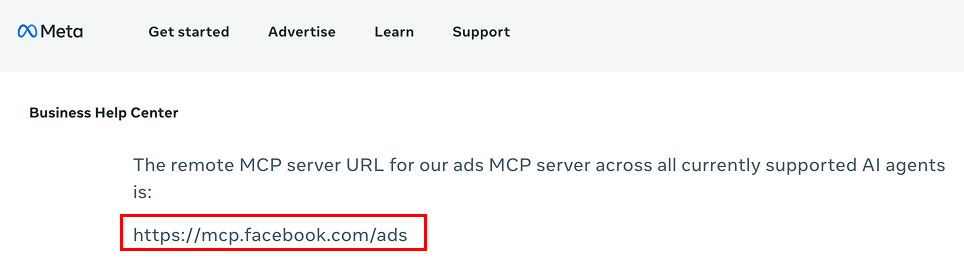 Meta publishes the official MCP server URL inside the Ads AI Connectors help article.
2. Open Claude and add a new connector
In Claude (desktop or web), click the small + icon at the bottom-left of the prompt bar, hover Connectors, and click + Add connector.
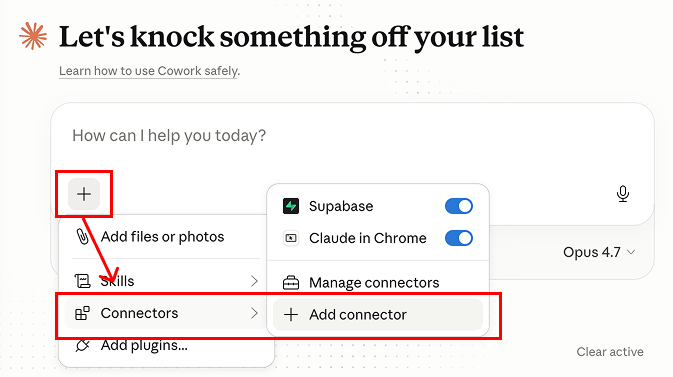 The fastest path: + → Connectors → Add connector.
3. Paste the URL and name the connector
A small Add custom connector dialog opens. Fill in:
- Name:
Meta MCP(anything works, but stay consistent so you can call it by name in prompts) - URL:
https://mcp.facebook.com/ads
Hit Add. Claude registers the connector but it isn't authenticated to your ad account yet.
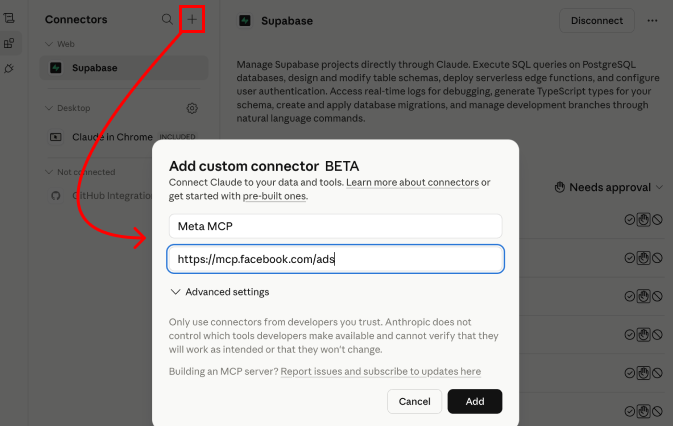 Two fields. The URL is the only one that matters.
4. Click Connect on the new connector card
Open + → Connectors → Manage connectors. You'll see your new Meta MCP entry. Click Connect on it. A Facebook OAuth window pops up. If you're already logged into Facebook in that browser, it jumps straight to the consent screen.
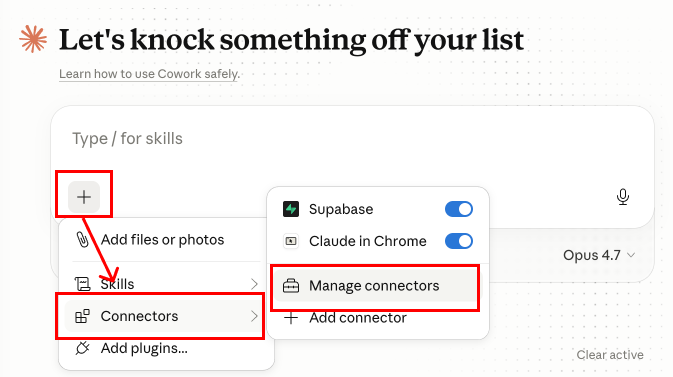 Manage connectors is where the Connect button lives for any connector you've just added.
5. Choose which businesses Claude can access
Meta asks whether Claude should access:
- Selected Businesses only (recommended for single-brand setups), or
- All current and future Businesses (handy for agencies on a shared Facebook profile)
You can change this later from Facebook → Business Integrations.
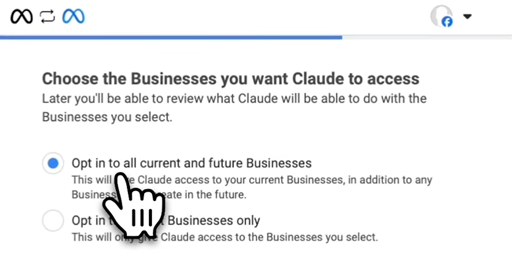 Pick the narrowest scope that still covers the accounts you want to query.
6. Review the permissions and save
Continue through the consent screen. The MCP requests four scopes:
- Manage your product catalogs
- Manage ads for ad accounts that you have access to
- Access your Facebook ads and related stats
- Manage your business
Read these. If any of them surprise you, this is the moment to back out. Hit Save to authorize.
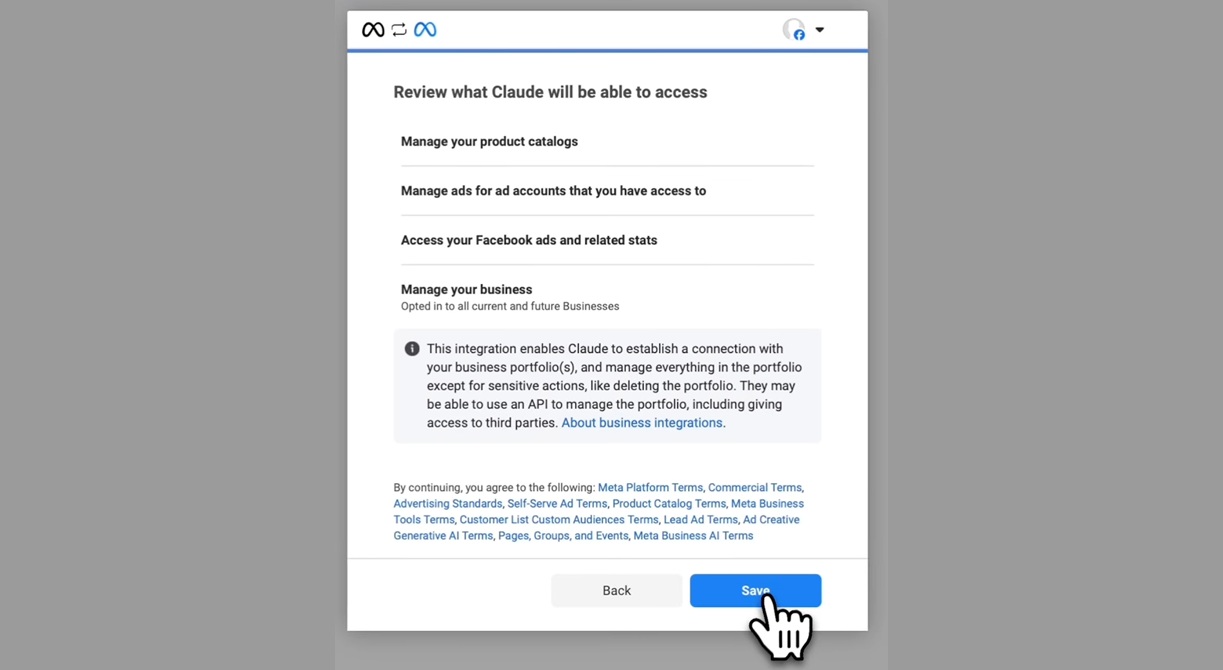 The four scopes the official Meta Ads MCP requests.
7. Restart Claude
After the consent screen closes, quit and reopen Claude. The new MCP tools are loaded at startup, so the first session won't see them. Once Claude is back, open Connectors and confirm Meta MCP is listed and active.
That's the entire setup. From copying the URL to a working Meta Ads MCP in Claude is roughly five minutes if you don't get distracted.
How do you connect the Meta Ads MCP to ChatGPT?
To connect the Meta Ads MCP to ChatGPT, open ChatGPT, go to Settings → Apps → Advanced settings, toggle Developer mode on, return to Apps, click Create app, paste https://mcp.facebook.com/ads into the MCP Server URL field, set the authentication type to OAuth, accept the risk warning, click Create, and complete the Meta OAuth flow. Setup is slightly longer than Claude but identical in concept.
The four field values that matter:
- Name:
Meta MCP(or anything you want) - MCP Server URL:
https://mcp.facebook.com/ads - Authentication:
OAuth(not No Auth, not Mixed). Pick OAuth or the connection will fail when you query. - Risk warning checkbox: ticked
After ChatGPT opens the Meta auth window, log in and pick which ad accounts to grant access to, exactly like the Claude flow above. The four scopes are the same. If a query later returns "no access", redo the OAuth step and check that the right ad account was granted.
Note on Gemini: Gemini's MCP support today is via the Gemini CLI (terminal-only). There's no one-click connector in the consumer Gemini chat. If you want a no-code setup, stick to Claude or ChatGPT.
🔍 If you'd rather not babysit a beta connector, Skaler gives you the same Claude-style chat over your Meta ad account in one click. No MCP setup. No whitelisting wait. See the Meta MCP alternative — 50% off your first month →
How do you actually use the Meta Ads MCP in Claude?
The first prompt to send is a discovery one: ask Claude which of your ad accounts the MCP can see, because in the beta rollout most accounts are not whitelisted. From there you can ask for reporting, create campaigns, or troubleshoot signals using natural language. Claude routes those requests through the MCP, which calls Meta's APIs as you.
A working starter prompt:
Use the Meta Ads MCP and give me the list of my ad accounts and which ones I can manage with it.
Claude will request permission to call the connector once. Approve it, and you'll see the list. Brace yourself: in our own day-one test, 0 of 16 ad accounts were actually enabled for the MCP. One of our clients reported 1 of 20. That's typical for a 24-hour-old beta, and Meta will widen access over time.
Once you know which account is whitelisted, here are ten starter prompts that actually pull useful output (not toy demos). Each one solves a real money-burn problem most teams catch days late in Ads Manager. Paste them into a fresh chat after the connector is on.
1. Spend pacing alarm
On
Account X, list every ad set that has spent more than 50% of its daily budget before noon today. Show campaign, ad set, hours active, percent of budget burned, and current CPA. Sort by percent burned descending.
Catches pacing fires while you can still cap them. The Ads Manager default view groups daily spend at the campaign level, so individual ad sets that are about to blow their budget are easy to miss until the day is gone.
2. Day-of-week budget map
Compare spend, CPA, and ROAS on
Account Xby day of week across the last 60 days. Tell me the two days I'm overpaying for traffic and the two days I should push more budget into.
Most accounts have a 30 to 50 percent CPA gap between the best and worst days of the week. Ads Manager doesn't surface it by default. The MCP runs the breakdown plus a written read of where to reallocate budget.
3. Saturation tell
On
Account X, find every ad set where CPM has risen more than 25% week-over-week AND audience size is below 2M. List ad set name, audience size, CPM last 7 days, CPM prior 7 days, and frequency. These are likely saturating.
Chains two conditions in one query, which is where the MCP starts earning its keep over the click-tax of Ads Manager filters. Saturating ad sets show up in this list 3 to 5 days before the CPA blow-up does.
4. Exclusion-leak audit
On
Account X, list every active ad set whose targeting overlaps with my "Purchasers - Last 30 Days" custom audience. Show campaign, ad set, audience definition, and last 7-day spend. These are leaks.
Real money-burn issue most teams catch weeks late. Acquisition campaigns silently retargeting recent buyers waste 5 to 15 percent of monthly spend on accounts above $50K/month. The MCP can scan all active ad sets in one prompt; doing this manually means clicking into every ad set's targeting tab.
5. Catalog drift hunter
Audit my product catalog. Find products with stale availability (last update older than 14 days) or feed errors that are still serving in active dynamic ads. Group by feed.
Catches catalog rot before it tanks DPA performance. Out-of-stock or stale products that keep serving in dynamic ads burn impressions on creative that can't convert. The MCP plugs straight into Meta's catalog diagnostics.
6. Bulk underperformer purge (with confirmation)
On
Account X, find every ad in any campaign that has spent over $200 in the last 7 days with ROAS below 1.0 and frequency above 4. List them in a table, then pause them in one batch. Ask me to confirm before pausing.
Demos the MCP's write side. The MCP will list, ask, and only act after you say yes. Manually building this list across 30+ campaigns is a half-hour of clicking; here it's one prompt.
7. Placement P&L cleanup
On
Account X, break down spend, ROAS, and CPA by placement (Feed, Stories, Reels, Audience Network, Marketplace) for the last 30 days. List placements where I'm spending more than 10% of total budget but ROAS is below 50% of account average.
Most accounts overpay for Audience Network and Marketplace placements that look cheap on CPM but tank on quality. The MCP runs the breakdown plus a placement-level kill list in one shot.
8. Iteration vs parent
On
Account X, for ads with iteration suffixes (v2,v3, etc), compare each iteration's CPA and ROAS against its original. Tell me which iterations beat the parent ad, which underperform, and by how much.
If your team ships 3 to 5 iterations per winning concept, this answers the question every Friday review tries to: "did the iterations actually help, or am I just refreshing for the sake of refreshing?"
9. Match-quality regression
On
Account X, list every conversion event where the EMQ (event match quality) score dropped more than 15 points in the last 30 days. Show event name, current EMQ, prior 30-day EMQ, and event volume.
The narrow version of "is my pixel healthy" that actually catches things. Match-quality drops are the silent killer of post-iOS ROAS, and they almost never trigger an Ads Manager warning until they've cost you a week.
10. Long-tail spend hunter
On
Account X, list every active ad spending less than $50 in the last 14 days. Sum the total spend. These are underdelivered ads I should consolidate or kill.
Big accounts leak 5 to 8 percent of monthly spend on ads that never escape the learning phase. Manually finding them is brutal because Ads Manager defaults to entity-by-entity views. One prompt, full leak audit.
For campaign creation specifically (Create a new traffic campaign on Account X called Test 2026), the MCP creates the campaign object, then the ad set, then the ad. Refresh Ads Manager and the entity will be there.
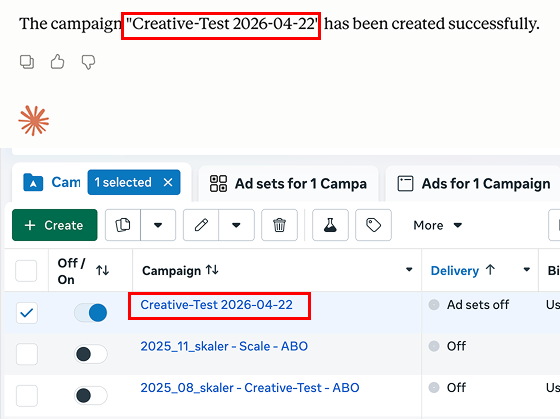 One prompt in Claude, one new campaign in Ads Manager. The MCP creates the campaign object and you can refresh to confirm.
You can also pin the model to something cheap (Claude Sonnet, not Opus) for these workflows. The reasoning required is "find the right tool and call it", not "solve a math olympiad". Smaller model = lower token bill, especially across hundreds of prompts a week.
What does the Meta Ads MCP actually do well?
The Meta Ads MCP is genuinely good at three things: spinning up basic campaign objects from a single prompt, giving plain-English answers to "how did account X perform last week", and turning catalog or signal-diagnostic friction into a chat. It removes the click-tax of Ads Manager for repetitive workflows and grounds the answer in real account data instead of hallucinated numbers.
That last point matters. Connect a generic LLM to a CSV of your ad performance and you get plausible-sounding ROAS commentary that may or may not match the data. The MCP routes the question through Meta's own systems, so the numbers Claude cites are the same ones you'd see in Ads Manager. No attribution drift between the agent's reasoning and the source.
Where does the Meta Ads MCP fall short?
The Meta Ads MCP has four real limitations in its current open beta: most ad accounts are not yet whitelisted (often 1 of 20 in early users' tests), several documented tools fail with permission errors on accounts that are whitelisted, the connector is Meta-only so cross-channel reporting is impossible, and there is no creative analytics layer, meaning the agent can't tell you which hooks, formats, or angles are actually driving ROAS.
Going through these one by one:
1. Most ad accounts are gated in the beta
The launch shipped on April 29, 2026. Almost every user testing it can see all their ad accounts on the Meta consent screen but only a handful are actually manageable through the MCP (we got 0 of 16 on day one; agency reports range from 1 of 12 to 4 of 20). The rest return errors when you query them. Meta will roll access wider over time, but if you're managing 5, 10, or 50 accounts today, the MCP is effectively a 1-or-2-account tool until further notice.
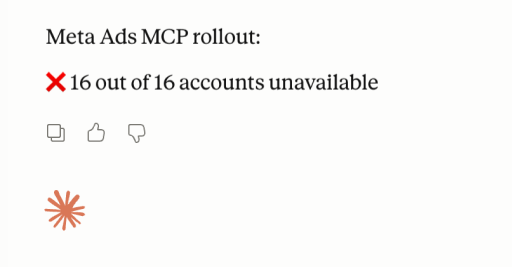 Real result from one of our day-one tests: 16 of 16 ad accounts unavailable. The MCP is connected, the OAuth scope covers them, and the rollout simply hasn't reached them yet.
2. Tools that should work, don't
Even on whitelisted accounts, several documented operations fail silently or with permission errors. From our own day-one tests and reports from other agencies running the beta, the five most common breakages right now:
list campaignson a non-whitelisted account. Returns an empty result with no error, even though the account is visible in the consent screen.- Editing creative on an existing ad. Often comes back as "tool not available" on accounts where
create campaignworked seconds earlier. - Pulling lookalike or custom audiences. Inconsistent results, sometimes empty, sometimes partial.
- Catalog mutations on multi-feed catalogs. Reading works; adding products programmatically can drop the request without raising.
- Bulk pause/edit across campaigns in one prompt. Single-entity edits work; "pause every ad with CPA > $40 across the account" sometimes only acts on the first few.
That's expected for a beta launched a few days ago, but it means you can't yet treat the MCP as the only interface to your account. Always sanity-check the action in Ads Manager.
3. It's Meta-only
The MCP only knows about Meta. If you're running paid social on TikTok, Snap, LinkedIn, Pinterest, or YouTube, you'll need a separate connector for each platform. For a multi-channel performance team, that's four to six MCPs, four to six OAuth flows, and four to six different schemas the LLM has to keep straight.
4. There's no creative analytics layer
This is the big one. The MCP can pull campaign-level metrics (spend, CPM, ROAS, CTR), but it doesn't know:
- Which hook is driving the conversions on your top-spending video
- Which visual format (UGC, before/after, product-only, talking head) is winning in your category
- Whether your competitors just shipped a new angle you should test
- How your creative compares to the median for your vertical
Those are the questions that drive real performance decisions, and they require ad-level AI tagging, scoring, and a competitor index, none of which the Meta MCP provides. You'd need to combine the MCP with a creative analytics tool to answer "what should I test next week".
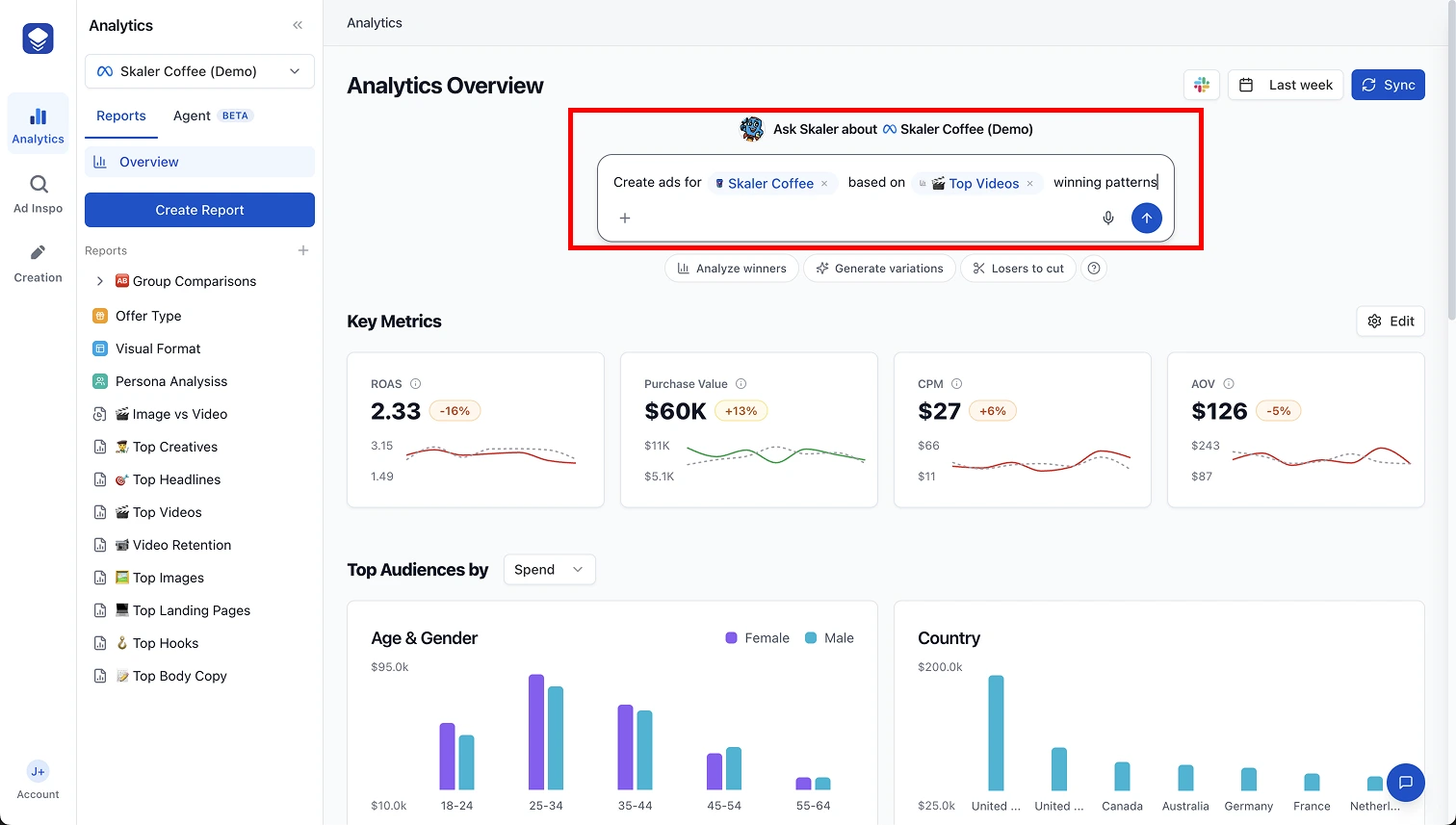 The kind of view the Meta MCP can't return: hook-level winners across an entire category, ranked by what's actually scaling. This is the layer the MCP doesn't have, and the layer Skaler is built around.
Frequently Asked Questions
What is the Meta Ads MCP server URL?
The official Meta Ads MCP server URL is https://mcp.facebook.com/ads. It's published in Meta's Ads AI Connectors help article and is the same URL across all currently supported AI agents.
Is the Meta Ads MCP free? Yes. The MCP itself is free and included in any Meta Business account. The cost is on the AI side: you pay for Claude Pro, ChatGPT, or whichever agent you connect, and you pay for the tokens those agents burn answering your prompts.
Why is only one of my ad accounts available in the Meta MCP? The Meta Ads AI Connectors are in open beta, and Meta is rolling whitelist access account by account. In the first weeks, most users see one or two of their ad accounts enabled and the rest return errors. Expect the list to grow over the next few months.
Will the Meta Ads MCP get my ad account banned? Highly unlikely. This is Meta's official, first-party MCP, authenticated through their own OAuth, with documented scopes. The reason third-party MCPs were getting accounts flagged earlier in 2026 was bad authentication, browser-based scraping, and unapproved API patterns. The official MCP avoids all three.
Does the Meta Ads MCP work with ChatGPT and other AI agents?
Yes. The same URL (https://mcp.facebook.com/ads) works in ChatGPT, Claude, and other MCP-compatible clients. Each client has its own connector UI, but the setup pattern is identical: paste the URL, authenticate with Facebook, restart the client.
Can I create entire ad campaigns through the Meta MCP? Partially. In the open beta you can spin up campaigns, ad sets, and ads through prompts, and the entities show up in Ads Manager. Some operations (like listing existing campaigns or editing creative on certain accounts) currently fail with permission errors. Don't run launch-day production campaigns through the MCP yet.
What if only some of your ad accounts have access to the MCP?
If the MCP shows you 0 of N accounts (we got 0 of 16 on day one), 1 of N (most launch-day reports), or even 3 of N usable, you're in the same place: you can't operate the way you want to. The accounts that matter most might be locked out, you can't run cross-account analyses, and any reporting workflow has to stop and check whitelist status first.
Three options to move forward:
- Wait. Meta is widening access account by account, unevenly. An account returning "no access" today often works the following week. Re-run the discovery prompt every few days. Mark the date you connected so you can track rollout speed.
- Reconnect from a different admin user. Some agencies report that connecting from a different admin on the same Business Manager flips additional accounts on. Worth 60 seconds.
- Use a tool that doesn't depend on Meta's whitelist. Skaler is a registered Meta app with proper OAuth that works on every ad account you have access to from minute one, no rollout queue, no per-account waiting. You get the same chat-with-your-ad-account interface plus the creative analytics layer the MCP doesn't have.
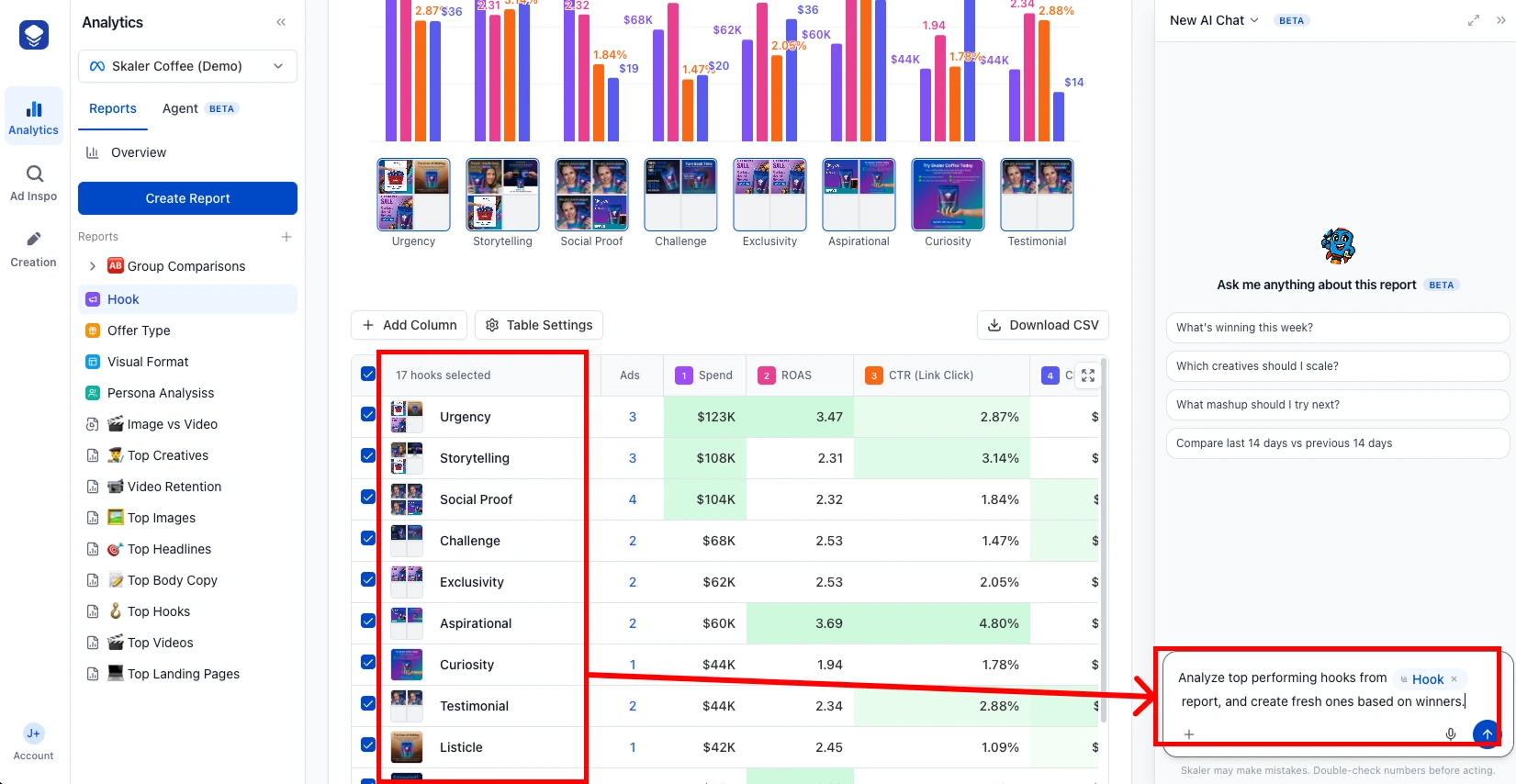 Skaler's chat sits on top of every Meta account you connect. Same Claude-style chat, same OAuth, but the data layer underneath is built for performance marketers (creative-level scoring, AI tagging, fatigue surfacing).
The takeaway
If you run a single Meta ad account and you live in Claude or ChatGPT, the Meta Ads MCP is worth setting up today. The five-minute install pays for itself the first time you skip a CSV export. But if you run multiple accounts, multi-platform spend, or you're trying to make creative decisions (not just operational ones), the MCP is a building block, not a finished product. You still need a system on top that knows what's working, why, and what to ship next.
That's where the next layer comes in.
A simpler way to chat with your Meta ads
Skaler is the closed-loop creative analytics chat for Meta ads, built specifically for performance marketers. It does the things the Meta MCP can't, and it does them without any MCP setup, whitelist queue, or model choice on your end.
Three differences that matter:
-
Connect any ad account in one click. Skaler is a registered Meta app with proper OAuth. You log in, pick the ad account, and the chat works on every account you have access to from minute one. No beta whitelist. No "1 of 20 supported" message.
-
Cross-channel and cross-account out of the box. The same chat thread can talk to multiple ad accounts, and the platform indexes ~3M public Meta ads from ~18K brands so you can ask things like "What is AG1 running this week?" or "Which UGC hooks are winning in supplements right now?" and get an answer grounded in real, recent ads, not generic advice.
-
Creative analytics that the MCP simply doesn't have. Every ad in your account is auto-tagged by hook, ad type, format, product, and angle. Every ad is scored on convert, click, hook, and watch performance. You can ask "Why is my top-spending creative dying?" and get a real answer, with the runner-ups ranked next to it.
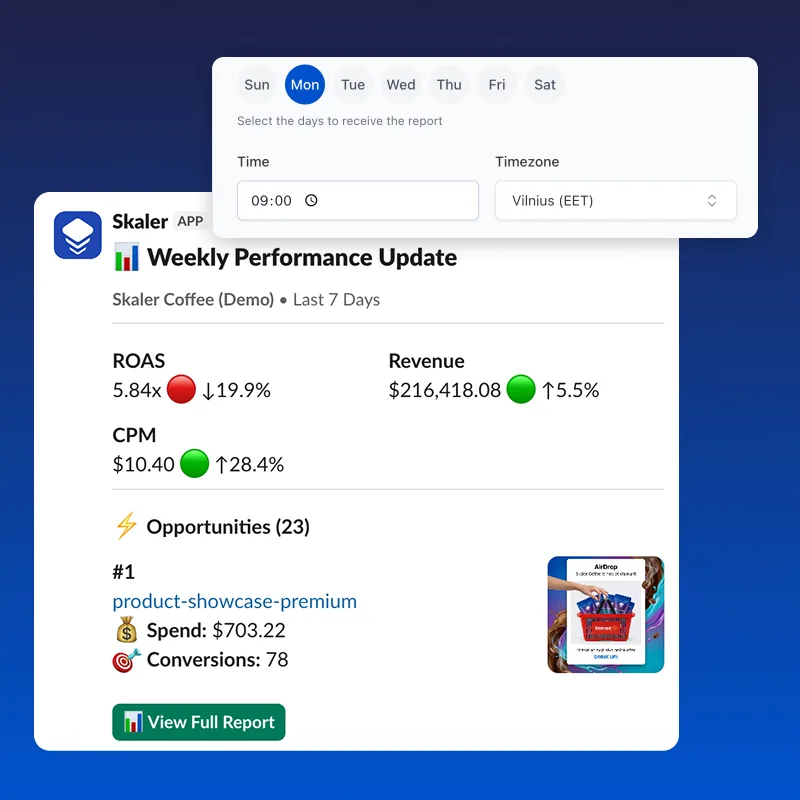 Bonus the MCP can't ship: Skaler can pipe weekly account summaries straight into Slack, including top performers, fatiguing creatives, and recommended next tests. The MCP gives you a chat. Skaler also gives you the workflow.
Here's what that looks like across four real ads pulled live from Skaler's index:
Four currently-active high-reach ads from four different verticals (Dr. Squatch, Huel, Wispr Flow, IM8). Skaler indexes the hook ("This deal is such a lie", "He doesn't eat any solid meals", "This is how to convert voice to text in any app", "This is what happens when you drink IM8 every day for 30 days"), the ad type, the visual elements, and the performance signals. That's the layer the Meta MCP doesn't have.
If you wanted to do this analysis through the Meta Ads MCP plus Claude, you'd need to combine the MCP with a separate scraping tool, an AI-tagging pipeline, and a competitor index. With Skaler it's the default chat.
Skaler lets you connect any Meta ad account in seconds, ask any question about your own ads or your competitors', and ship new creative variations in the same chat. No MCP setup. No whitelist wait. Get the Meta MCP alternative — 50% off your first month →
Related Articles

The 80 Most-Saved Meta Ads of August 2026 (Free Swipe File)
We tracked the 80 Meta ads media buyers saved the most this month — from Seed and Loop to AI soap operas running across 9 ad sets. Browse all 80 free, plus the 4 patterns behind them.
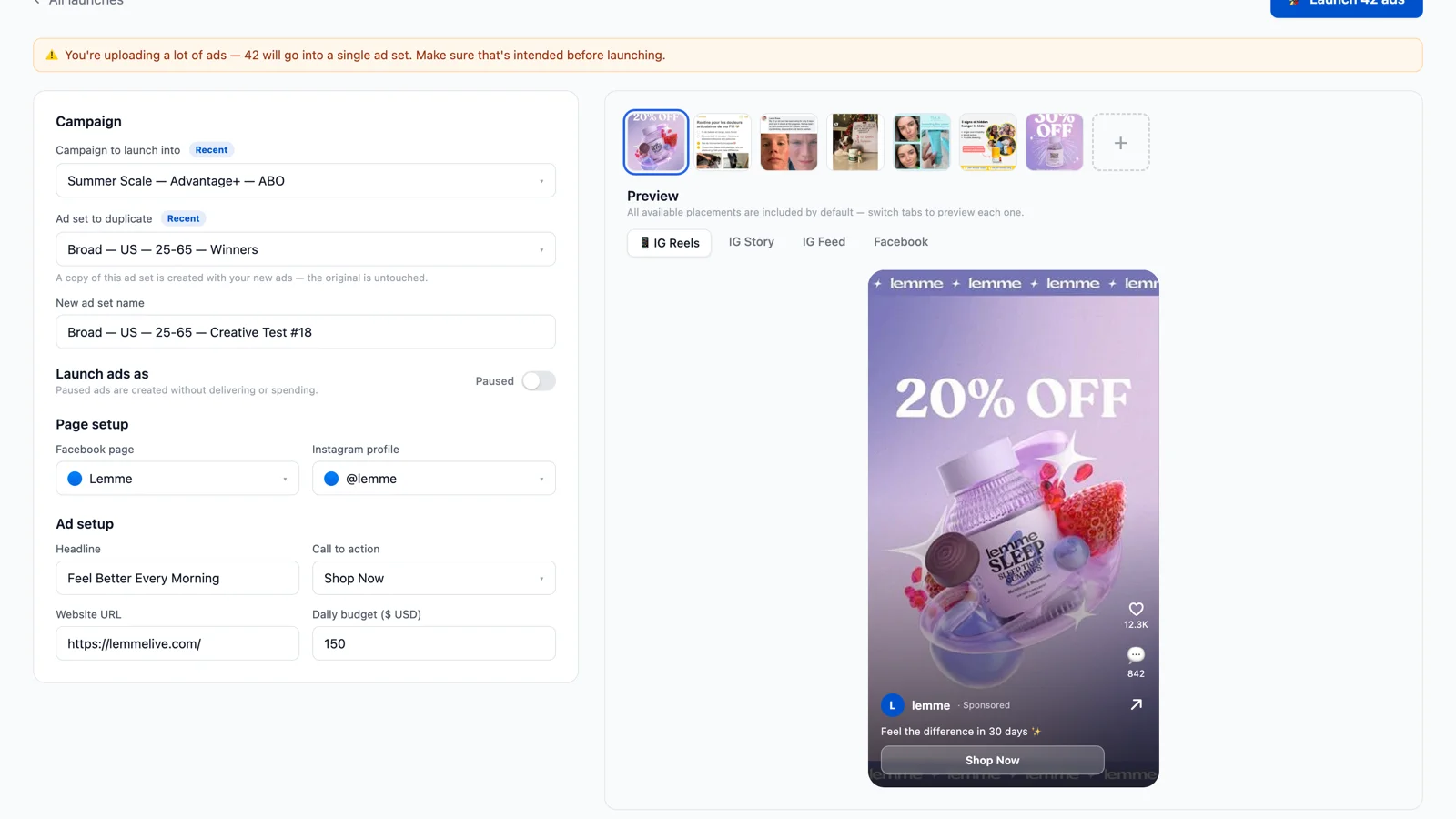
Bulk Ad Launcher for Meta: Launch 100 Facebook Ads in One Click
Skaler's new Bulk Ad Launcher takes you from creatives to live Facebook ads in minutes — drag and drop up to 100 files, duplicate a winning ad set, and launch with copy, budgets, and tracking auto-filled.