
How to Set Up Meta Conversions API in One Click (2026 April Guide)
Meta now offers a one-click Conversions API setup, no code required. Here's how to enable Meta-enabled CAPI in 6 steps and improve your ROAS.

 Follow on LinkedIn
Meta just shipped a no-code, one-click Conversions API setup. Here's the 6-click walkthrough and what it actually changes for your ad performance.
TL;DR: On April 15, 2026, Meta launched the Meta-enabled Conversions API, a one-click, no-code, no-maintenance way to add server-side tracking to your Meta Pixel. According to Meta, advertisers running Conversions API see a 17.8% lower cost per result vs. Pixel-only setups. Setup takes about 60 seconds inside Events Manager: Connect Data → Web → choose your dataset → See other ways to set up → Set up with Meta. Done.
For the last five years, Conversions API (CAPI) has been the single biggest gap between sophisticated advertisers and everyone else. The advertisers running CAPI saw cleaner attribution, cheaper conversions, and better optimization. The advertisers without it had a developer ticket sitting in Jira for 18 months. As of April 15, 2026, Meta has effectively erased the technical setup as an excuse.
This post is the short version: what the new Meta-enabled CAPI is, the exact six clicks to turn it on, and when you should still pay a developer instead.
What is the Meta Conversions API?
The Meta Conversions API (CAPI) is server-side tracking for your website. Instead of relying on the Meta Pixel in a user's browser (which is increasingly blocked by ad blockers, iOS privacy, and ITP), CAPI sends conversion events directly from your server (or Meta's, in the new setup) to Meta. The result is more reliable signal for optimization, attribution, and audience building, especially for purchases that happen after the browser-side Pixel fires (or fails to fire).
You typically run CAPI alongside the Pixel, not instead of it. Events sent through both channels get deduplicated by Meta. The combined signal is what drives lower CPAs.
What changed on April 15, 2026?
Meta shipped two updates inside Events Manager. The big one is the Meta-enabled Conversions API: a one-click setup that creates a server-side connection from Meta's own infrastructure to your Pixel data, with no code, no servers to maintain, and no ongoing engineering work. The second is an AI-enhanced Pixel that automatically pulls in product names, prices, availability, and business details without requiring developers to manually annotate every page.
Before April 15, getting CAPI live looked like one of three things:
- A custom developer build (server, access tokens, event payloads, hashing, deduplication, ongoing maintenance).
- A partner integration (Shopify's Facebook & Instagram app, WooCommerce plugin, GTM server-side container, third-party tools).
- Doing nothing, because the above was too much work.
The Meta-enabled setup adds a fourth path: Meta runs the server, you click a button. For a small DTC brand without a developer, this is the difference between never getting CAPI live and being live in a minute.
How to set up Meta-enabled Conversions API in 6 clicks
To enable Meta-enabled CAPI, open Meta Events Manager, click Connect Data in the left navigation, choose Web, select your existing Pixel (or create a new dataset), click See other ways to set up, and then Set up with Meta. Total time: under 60 seconds. You don't touch your website or your server.
Step-by-step:
1. Open Events Manager
Head to business.facebook.com/events_manager and pick the Business Account that owns your Pixel.
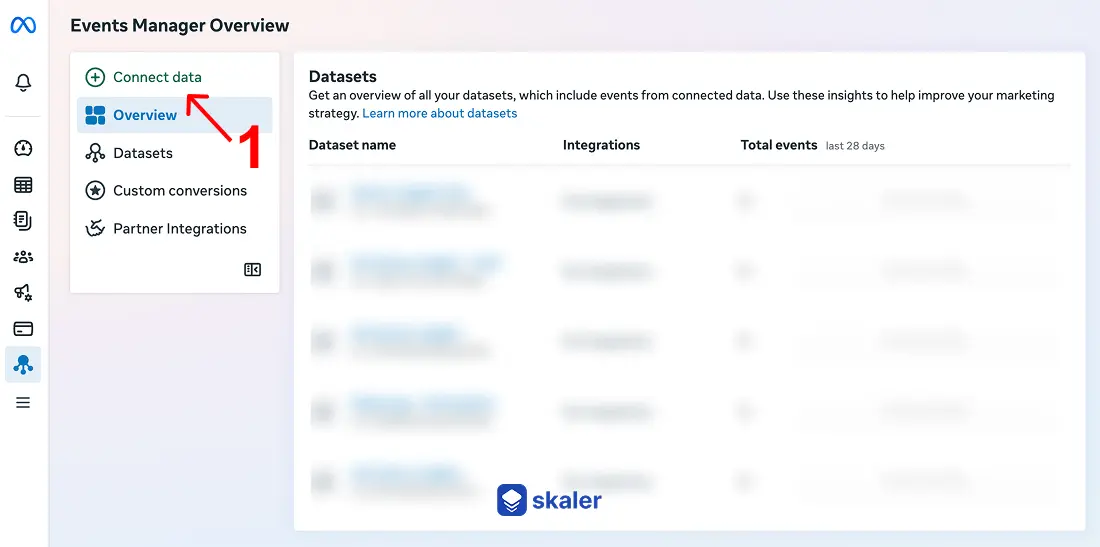
2. Click "Connect Data" in the left navigation.
This opens the data source setup flow. You'll be prompted to choose what kind of data source you want to connect.
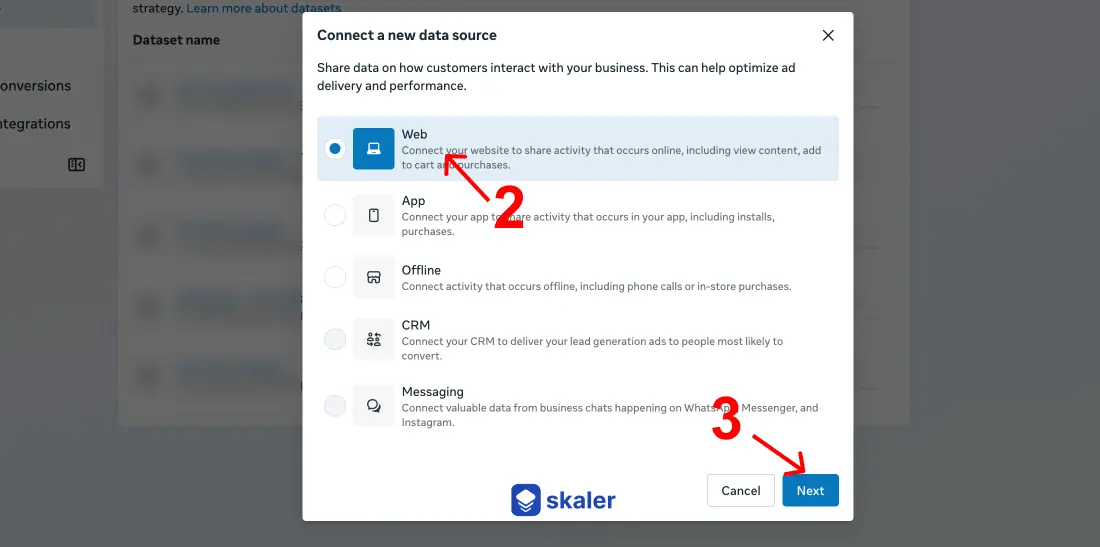
3. Select "Web" → click "Next"
This is the path for website-based tracking (i.e. an ecommerce store, lead-gen site, or any web property where the Pixel currently lives).
4. Pick your existing Pixel, or create a new dataset
Meta-enabled CAPI piggybacks on a dataset (the new name for what used to be "Pixel"). If you already have a Pixel firing, select it. If you're starting fresh, create a new dataset with the same flow.
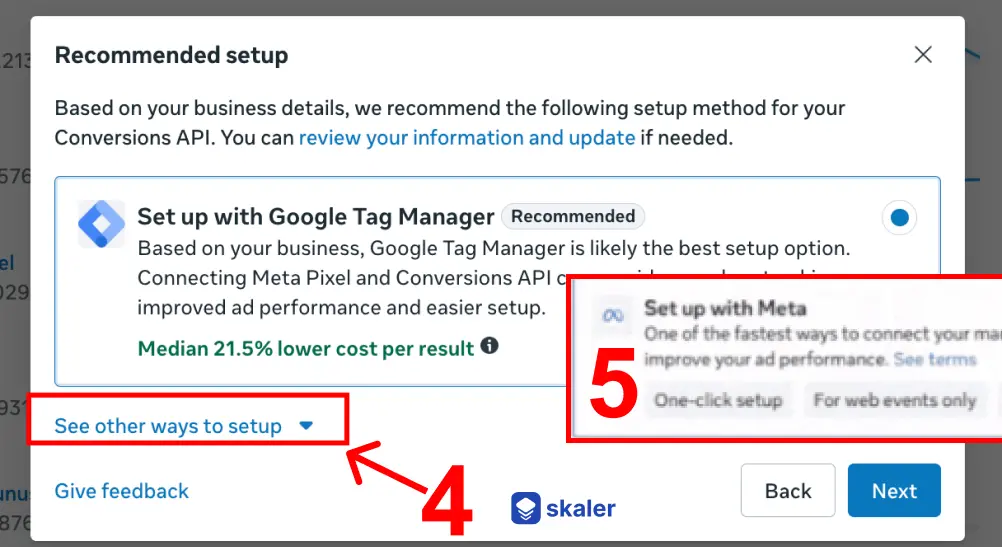
5. Click "See other ways to set up"
This is the click most people miss. The default flow nudges you toward partner integrations (Shopify, WooCommerce, etc.). The Meta-enabled CAPI option lives one click deeper.
6. Select "Set up with Meta"
Confirm, and you're done. Every event already firing through your Pixel will now also be sent server-side through the Meta-enabled Conversions API. Events are automatically deduplicated, so you won't see double counts in Ads Manager.
If you already have a custom CAPI setup or a partner integration (Shopify, WooCommerce, GTM server-side, etc.), you don't need to do anything. Meta-enabled CAPI is additive, not a replacement, and your existing configuration keeps working.
Should you use the one-click setup, a partner integration, or a custom build?
Use Meta-enabled CAPI if you have a Pixel installed but no server-side tracking, your store isn't on Shopify/WooCommerce (or it is but you haven't connected the Meta app yet), and you don't have a developer on retainer. This is the right path for ~80% of small and mid-market advertisers.
Use a partner integration if you're on Shopify, WooCommerce, or BigCommerce. Their native Meta apps already include CAPI and tend to send richer first-party data (hashed email, phone, customer data) than what Meta-enabled CAPI captures from the Pixel alone. Partner integrations also handle deduplication for you out of the box.
Build a custom integration if you're spending $50K+/month, run a non-standard checkout (post-purchase upsells, subscription rebills, headless commerce, custom server-side cart), or you need to send offline conversions, CRM events, or lifecycle events that the Pixel never sees. Custom CAPI gives you control over event_id deduplication, event match quality (EMQ), and what first-party identifiers (email, phone, external_id) get hashed and forwarded.
A useful frame: Meta-enabled CAPI lifts the floor. Partner integrations and custom builds raise the ceiling. Most advertisers should start with the one-click setup, then graduate to a partner integration or custom build once they outgrow it.
🔍 While your server events settle in, check whether creative is your real bottleneck: the free AI ads analyzer scores any ad creative in about 30 seconds — no signup needed.
What about the new AI-enhanced Pixel?
The AI Pixel update is a sibling release that automatically attaches product and page metadata (product name, price, availability, business name, page type) to each event, without requiring developers to manually annotate the site. According to PPC Land's coverage, Meta is rolling it out with a 30-day notification window for existing Pixel users; if you take no action, it switches on automatically after 30 days. You can disable it or restrict specific data categories any time inside Events Manager.
Why it matters: Meta's optimization gets better the more context it has. A raw "PageView" event tells the algorithm almost nothing. A PageView enriched with product_name=Shoe XYZ, availability=in_stock, price=89.99 gives Meta a structured signal it can match to bid, audience, and creative decisions. Before this update, that metadata required microdata or manual server-side parameters. Now the AI infers it from the page itself.
Special-category advertisers (financial products, health, employment, housing) won't get the AI Pixel; the same restrictions apply to the new CAPI setup. If that's you, your Events Manager will say so, and the option will be greyed out.
How do you verify your Conversions API is working?
After enabling Meta-enabled CAPI, browse to your site, fire a few events (view a product, add to cart, complete a test purchase), then go back to Events Manager and check the Test Events tab and the dataset's Overview screen. You're looking for events showing up under both the Browser (Pixel) and Server (CAPI) channels, with deduplication confirmed and an Event Match Quality (EMQ) score of "Good" or higher.
A 3-minute QA pass:
- Test Events tab: send a real event from your site. You should see it land twice within seconds (once as Browser, once as Server). If only one channel shows, the dual setup isn't live yet, give it 5 minutes for the dataset to propagate.
- Overview tab → Event Coverage: check the percentage of conversions captured. Pixel-only is typically 60-80% in 2026; once CAPI is on, expect that to climb toward 90%+.
- Event Match Quality: this score (out of 10) measures how well Meta can match your events to a Facebook/Instagram account. Anything 6+ is workable; aim for 8+. To raise it, send hashed first-party identifiers (email, phone) which the Meta-enabled flow alone doesn't capture, that's a partner-integration or custom-build benefit.
- Compare Ads Manager numbers: pull a 7-day window before and after. Cost per result should drop, and reported conversions should go up because more events are now being captured.
If you see duplicate events (the same purchase counted twice), check that the Pixel's eventID parameter is being forwarded. Meta-enabled CAPI handles this automatically for events that originated in the Pixel; double-counting usually only appears when a partner integration is also live.
Common pitfalls to watch for
The new flow is simple, but four mistakes still trip people up:
- Skipping "See other ways to set up." The default flow funnels you to partner integrations. The Meta-enabled CAPI option only appears after that extra click.
- Stacking Meta-enabled CAPI on top of a partner integration. If Shopify's Facebook app is already sending CAPI events, you don't need (and shouldn't add) Meta-enabled CAPI on the same dataset. Pick one server-side path per dataset.
- Assuming CAPI fixes bad event configuration. If your Pixel is firing the wrong event names, no
valueorcurrency, or has duplicate Purchase events on confirmation pages, server-side won't fix that. Audit your Pixel before assuming CAPI is the bottleneck. - Forgetting consent flags. EU/UK traffic still needs Limited Data Use (LDU) and consent signals passed properly. Meta-enabled CAPI inherits whatever consent status your Pixel has; if the Pixel is firing on users who didn't consent, the server-side events inherit that problem.
What this means for your ad performance
For most small-to-mid advertisers, flipping on Meta-enabled CAPI is the single highest-ROI hour you'll spend this quarter. The 17.8% lower cost per result figure is Meta's own number, and your mileage will vary based on starting Pixel quality, but even a conservative 8-10% improvement in CPA, on a $20K/month budget, pays for a full creative testing cycle.
Three things to do this week:
- Audit your dataset coverage in Events Manager. If you're below 70% event coverage, CAPI will move the needle materially.
- Decide your CAPI path using the matrix above (Meta-enabled vs partner vs custom).
- Set a 14-day baseline before flipping the switch, so you can measure CPA, ROAS, and conversion volume changes cleanly.
Once tracking is solid, the next bottleneck shifts to creative quality. Better signal lets Meta's algorithm find your buyers faster, but it can't make a weak ad work. That's the part where competitive intelligence matters most: see How to Analyze Ad Performance and Facebook Ads Not Converting? 15 Reasons Why for the creative side of the same equation.
Frequently Asked Questions
Is Meta-enabled CAPI free? Yes. According to Meta's announcement, the Meta-enabled Conversions API has no setup cost, no ongoing fees, and no maintenance overhead. You're only paying for ads, not for the tracking infrastructure.
Do I still need the Meta Pixel if I have CAPI? Yes. Meta recommends running both in parallel. The Pixel captures browser-side signals (especially click attribution and engagement events), CAPI captures server-side conversions. Together they give Meta the cleanest possible data for deduplication and optimization. See Meta's Conversions API documentation for the official guidance.
Will Meta-enabled CAPI replace my Shopify or WooCommerce integration? No, it's additive and not necessary if you already have a working partner integration. If Shopify's Facebook & Instagram app is already sending server-side events, you don't need to also enable Meta-enabled CAPI on the same dataset. Adding it on top can create duplicate paths and won't improve performance.
How long until I see results after enabling CAPI? Allow 7 to 14 days for the algorithm to recalibrate on the new event volume. Most advertisers see CPA improvements within 2 weeks if their starting Pixel coverage was poor. If you were already at 90%+ event coverage with a partner integration, the Meta-enabled flow won't materially change anything.
Is the AI-enhanced Pixel safe for sensitive data? According to Meta, special-category advertisers (financial services, healthcare, employment, housing) are excluded from the AI Pixel feature, and the same restrictions apply to the new CAPI flow. Meta's existing Business Tools terms still govern what advertisers are allowed to send. Review your data categories in Events Manager before activation.
What's the difference between Meta-enabled CAPI and a Conversions API Gateway? The Conversions API Gateway is a self-hosted server (typically on AWS or GCP) that an agency or developer sets up. Meta-enabled CAPI is hosted by Meta. The Gateway gives you more control and can pipe in non-Pixel events (CRM, offline, app); Meta-enabled CAPI is plug-and-play for web events only.
The takeaway
The technical bar for running CAPI just dropped to one click. If you've been telling yourself "we'll get to CAPI when we have engineering bandwidth," that excuse died on April 15. Open Events Manager, click through the six steps, and ship it. The 17.8% cheaper conversions are sitting there waiting; the only thing between you and them is the click you skipped last quarter.
For larger advertisers and ecommerce brands on Shopify/WooCommerce, the call is different: you probably already have a partner integration sending richer data than Meta-enabled CAPI will. Don't downgrade to chase the new shiny option. Instead, double down on creative quality, LTV, and incrementality testing, where the next 17.8% in efficiency is now living.
Find your competitors' best ads while CAPI does the math
Better tracking gives Meta cleaner signal. Better creative gives the algorithm something worth optimizing toward. Skaler lets you search and analyze the actual ads your competitors are running on Meta, TikTok, and LinkedIn, so you walk into your next creative sprint with proven hooks instead of a blank canvas.
Score one of your ads free — no signup → · Create a free account →
Related Articles
The 80 Most-Saved Meta Ads of August 2026 (Free Swipe File)
We tracked the 80 Meta ads media buyers saved the most this month — from Seed and Loop to AI soap operas running across 9 ad sets. Browse all 80 free, plus the 4 patterns behind them.
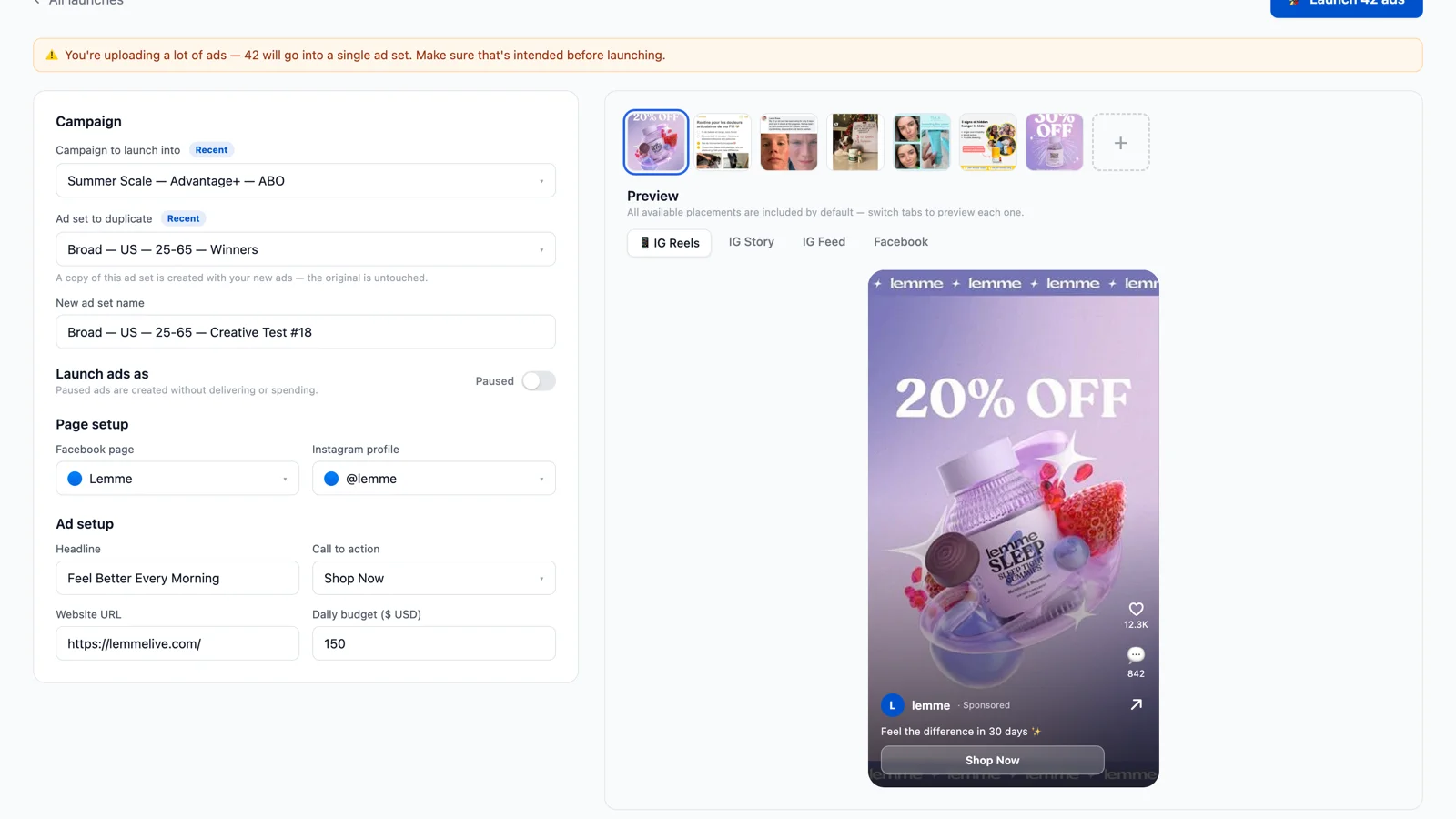
Bulk Ad Launcher for Meta: Launch 100 Facebook Ads in One Click
Skaler's new Bulk Ad Launcher takes you from creatives to live Facebook ads in minutes — drag and drop up to 100 files, duplicate a winning ad set, and launch with copy, budgets, and tracking auto-filled.