
Facebook Ads Not Converting? 15 Reasons Why (and How to Fix Them in 2025)
Your Facebook ads are getting clicks but not sales? Or not even clicks? Here's a practical 2025 playbook to diagnose why your Facebook ads aren't converting—and how to fix it fast.

 Follow on LinkedIn
You're pumping budget into Facebook, but results are flat:
- Clicks but no purchases
- Add to carts but no checkouts
- Or worst of all: no clicks at all
You're not alone. Facebook (Meta) ad revenue grew to $164.5B in 2024—up 22% year-on-year—which means more competition in the auction and more pressure on performance.
At the same time:
- Average traffic CTR on Facebook is now around 1.71%, up from 1.57% last year.
- Average conversion rate (CVR) across industries sits around 9%.
- For lead gen, cost per lead is up ~21% YoY to ~$27.66.
So clicks are still there—but turning those clicks into revenue is getting harder and more expensive.
This guide breaks down 15 reasons your Facebook ads aren't converting (or "aren't working") and what to do about each one, with 2024–2025 benchmarks so you can tell whether you actually have a problem—or just unrealistic expectations.
Table of contents
- First: are your Facebook ads really underperforming?
- 2024–2025 benchmarks: what "good" looks like
- 15 reasons your Facebook ads are not converting (and how to fix them)
- 1. You're comparing to the wrong benchmarks
- 2. Your conversion tracking is broken or incomplete
- 3. You're optimizing for the wrong objective or event
- 4. Your offer isn't strong enough for the audience
- 5. Your ad and landing page don't match
- 6. Your landing page is slow or confusing
- 7. Hidden tech issues are quietly killing conversions
- 8. Your creative is fatigued
- 9. You don't have enough creative volume or variation
- 10. You're targeting the wrong people (or too many of them)
- 11. Your audiences are overlapping and competing
- 12. Your budget, bids, or learning phase are fighting you
- 13. Your attribution window hides the impact of Facebook
- 14. Your vertical, price point, and sales cycle don't match your expectations
- 15. Your creative process can't keep up with 2025 competition
- A simple diagnostic checklist (ads not converting)
- Where creative analytics and competitor data fit in
First: are your Facebook ads really underperforming?
Before you tear everything apart, you need to answer one question:
Are my Facebook ads actually bad, or just not as magical as I hoped?
Look at these core metrics in Ads Manager:
- CTR (link click-through rate) – Is the creative getting attention?
- CPC – Are you paying a reasonable amount per click?
- Conversion Rate (CVR) – Are people who click actually taking the action you want?
- Cost per result (CPA/CPL) – Are you acquiring leads/sales within your target cost?
- ROAS – For ecom / revenue campaigns, is the campaign profitable?
Roughly:
- If CTR is low and conversion rate is okay → creative / audience problem.
- If CTR is fine but conversion rate is low → landing page / offer / technical problem.
- If both CTR and CVR are low → you likely have an offer + creative + audience mismatch.
You can't fix "Facebook ads not working" in the abstract. You fix specific bottlenecks in the funnel.
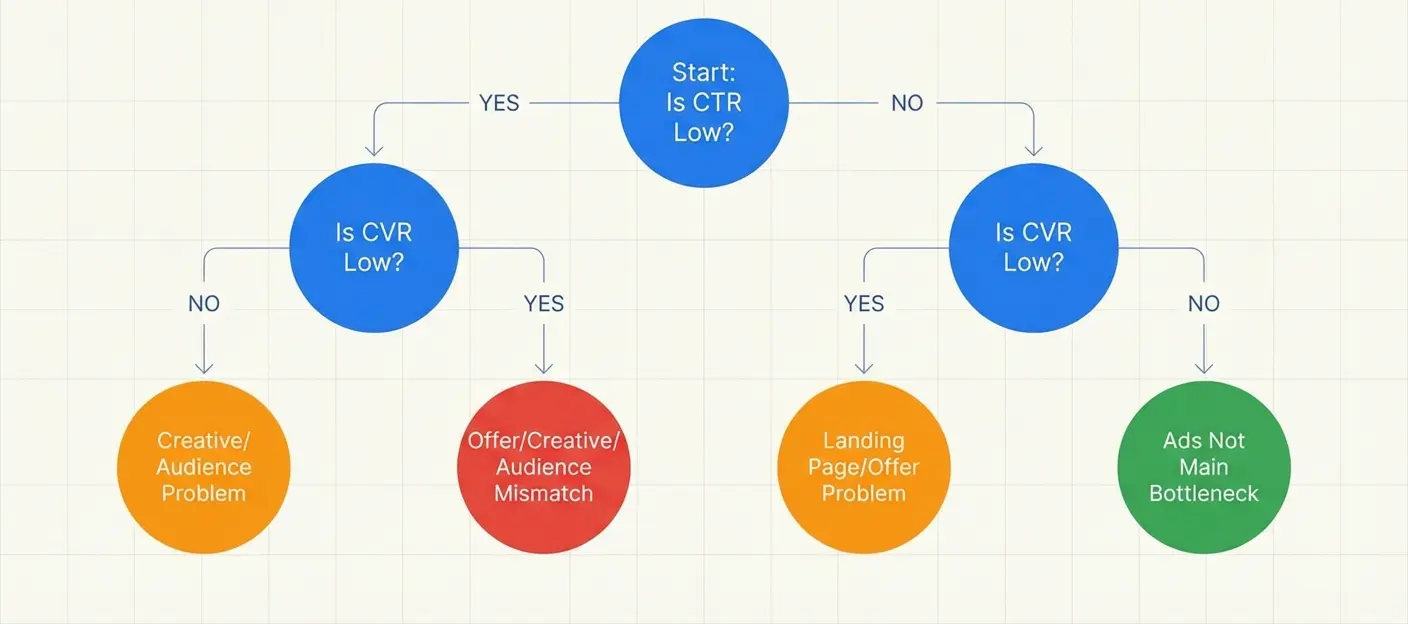 Quick diagnostic: Is it a creative problem, landing page problem, or both?
2024–2025 benchmarks: what "good" looks like
Benchmarks aren't gospel, but they help you see if you're way off.
Recent 2024–2025 data suggests:
- Average Facebook traffic CTR (all industries): ~1.7%
- Average Facebook CVR (all industries): ~9%
- Average CPC for lead campaigns: ~$1.90
- Average Facebook lead cost across industries: ~$27.66 (up ~21% YoY)
- Average landing page conversion rate overall: ~6.6%
- Global e-commerce site CVR: ~1.6–3.4% depending on niche
So if you're seeing:
- CTR below ~0.7% on prospecting → likely creative or audience issue
- Landing page CVR below 2–3% in ecom → likely offer, UX, or tech issue
- CPL 2–3x higher than these numbers → worth digging into every step of the journey
Keep these baselines in mind as we go through the common reasons ads don't convert.
15 reasons your Facebook ads are not converting (and how to fix them)
1. You're comparing to the wrong benchmarks
A classic trap: comparing your high-ticket B2B service to an impulse-buy DTC brand.
- A $30 skincare product can realistically hit 8–12% CVR from warm traffic.
- A $5K/month SaaS or agency retainer probably converts under 3% of clicks on the first touch and needs multiple steps in the funnel.
Fix:
- Benchmark against your model, not just internet averages.
- For ecom, compare to vertical-specific data whenever possible.
- For lead gen, work backward from margin and close rate, not "industry average CPL."
If your CVR is "low" but your customer lifetime value (LTV) is high and your CAC/LTV ratio is healthy, your ads might be doing just fine—you just need to scale carefully.
2. Your conversion tracking is broken or incomplete
If your Facebook pixel / Conversions API setup is off, Ads Manager is basically guessing.
Common issues:
- Pixel installed on some pages but not on the thank-you / purchase confirmation.
- Standard events mis-labeled (e.g.,
Leadfiring on page view). - CAPI sending duplicate events.
- No value parameters ⇒ ROAS numbers are useless.
When this happens, you get:
- Under-reported conversions (ads look like they're not converting).
- Algorithm optimizes toward the wrong signals.
Fix:
- Go to Events Manager and verify that:
- Key events (ViewContent, AddToCart, InitiateCheckout, Purchase, Lead) fire exactly where they should.
- Event counts look reasonable versus Shopify/your backend.
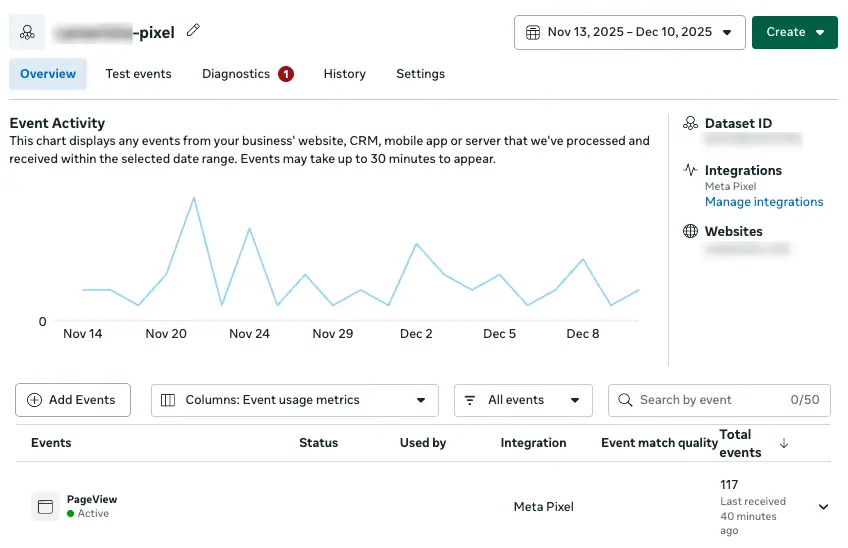 Events Manager: Check that your key events are firing correctly and consistently.
- Use the Meta Pixel Helper Chrome extension to debug pages.
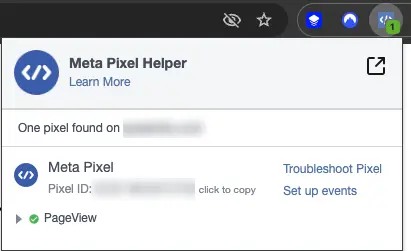 The Pixel Helper extension shows exactly what events fire on each page.
- If you're using both pixel + CAPI, ensure deduplication is configured.
Get tracking right first. Otherwise every optimization decision is built on sand.
3. You're optimizing for the wrong objective or event
Meta can only optimize based on what you tell it.
If you're:
- Optimizing for Purchase with a tiny budget and a high-ticket product, you might never hit enough events (Meta needs roughly 50 events per ad set per week to learn).
- Using a Traffic objective when you actually care about leads or sales, Meta will happily send you cheap clicks from low-intent users.
Fix:
- For new accounts or expensive products, start by optimizing for a higher-funnel event (e.g. Add to Cart, Lead) until you have enough volume to switch to Purchase.
- Make sure your campaign objective matches your real goal:
- Awareness → reach / video views
- Lead gen → Leads
- Direct sales → Sales / Conversions
- Don't mix "warm" and "cold" goals in the same campaign.
You don't have "Facebook ads not working"—you have Facebook doing exactly what you asked, but you asked for the wrong thing.
4. Your offer isn't strong enough for the audience
Facebook's auction is getting busier every year. Global social ad spend is forecast to hit $247B+ in 2024, with Meta capturing a huge chunk of that.
That means users see more ads than ever. Weak offers simply get ignored.
Symptoms:
- CTR under ~0.7% on cold audiences.
- "Nice" comments but no adds to cart / leads.
- People engage, save, or share—but don't buy.
Fix:
-
Tighten the value proposition:
- "Save money" → "Cut acquisition cost by 32% in 60 days or less"
- "High quality" → "Lifetime warranty + free 2-day shipping"
-
For lead magnets, move away from generic ebooks and toward:
- Calculators
- Templates
- Industry benchmarks
-
For DTC, test:
- Bundles vs single products
- Price anchoring ("Was $89, now $59")
- Clear guarantees
No amount of targeting tricks will fix an offer that simply isn't compelling enough for the price point and friction involved.
5. Your ad and landing page don't match
One of the fastest ways to tank conversion rate:
Promise X in the ad, deliver Y on the page.
Examples:
- Ad: "50% OFF today only" → Page: "Sign up for our newsletter"
- Ad: "No-code marketing dashboard" → Page: dense feature page for engineers
- Ad: clean, modern creative → Page: outdated, cluttered template
Why it matters:
Users bail within seconds when there's even a small disconnect. And with average landing page conversion rates around 6.6%, you can't afford that friction.
Fix:
- Use the same headline, imagery, and promise in the ad and above the fold on the landing page.
- If your ad offers a specific bonus or discount, repeat it clearly on the page.
- Strip the page down to one primary CTA aligned with your campaign objective.
Quick test: open your ad and landing page side by side. Would a stranger instantly know these belong together?
6. Your landing page is slow or confusing
"Ads not converting" is often just "site too slow" in disguise.
Recent studies show:
- Every 100ms improvement in load time can significantly boost conversion rates, especially in fast-moving verticals like travel and e-com.
- Global e-com CVR averages 1.6–3.4%, so even a small hit from slow pages is brutal.
If your page takes 4–6 seconds to load on mobile, many users never even see your carefully crafted offer.
Fix:
-
Run your key funnel pages through:
-
Focus on:
- Compressing images and videos
- Reducing render-blocking scripts
- Using a proper CDN
-
Simplify the layout:
- Clear hierarchy, no wall of text
- Visible CTA above the fold
- Minimal distractions in the checkout / form flow
Sometimes the biggest uplift in ROAS comes not from "better ads" but from shaving seconds off your load time.
7. Hidden tech issues are quietly killing conversions
Not all problems are visible on a screenshot.
You can have:
- A payment gateway error only for certain card types
- Checkout failing on specific browsers
- Geo-specific downtime from your host/CDN
- A single broken script blocking the "Complete order" button
From the Ads Manager side, this all looks exactly like: "Facebook ads not working".
A significant chunk of "lost" conversions each year can be traced back to these invisible failures—not the ads or even the offer.
One way performance teams de-risk this is by using tools like synthetic monitoring: automated checks that regularly hit your key funnels from different locations and devices, and alert you if pages slow down or break. Instead of waiting for ROAS to crash before you notice, you catch issues the moment they appear, while the campaigns keep running.
You don't need a huge dev team to do this. Even a simple monitoring setup on product pages, checkout, and key lead forms is enough to protect a lot of spend.
8. Your creative is fatigued
Ad fatigue is getting worse:
- Users report ignoring repetitive ads; in some regions, two-thirds of people say they tune out ads they see too often.
- Higher budgets mean your creatives burn out faster—what used to work for 30 days might die in a week at higher spend.
Symptoms:
- Frequency creeping up, CTR going down
- CPC and CPA rising without any changes to targeting
- "This used to be a winning ad" nostalgia
Fix:
-
Track frequency alongside CTR and CPA. As a rough guide:
- Cold audiences often fatigue around 3–5 frequency.
- Retargeting can tolerate more, but watch the trend line.
-
Always have 3–5 creatives per ad set.
-
Don't "micro tweak" fatigued ads; test new angles:
- Before/after
- Social proof / UGC
- "Here's why this didn't work for me at first" contrarian angles
The game in 2025 isn't "set and forget"—it's continuous creative refresh.
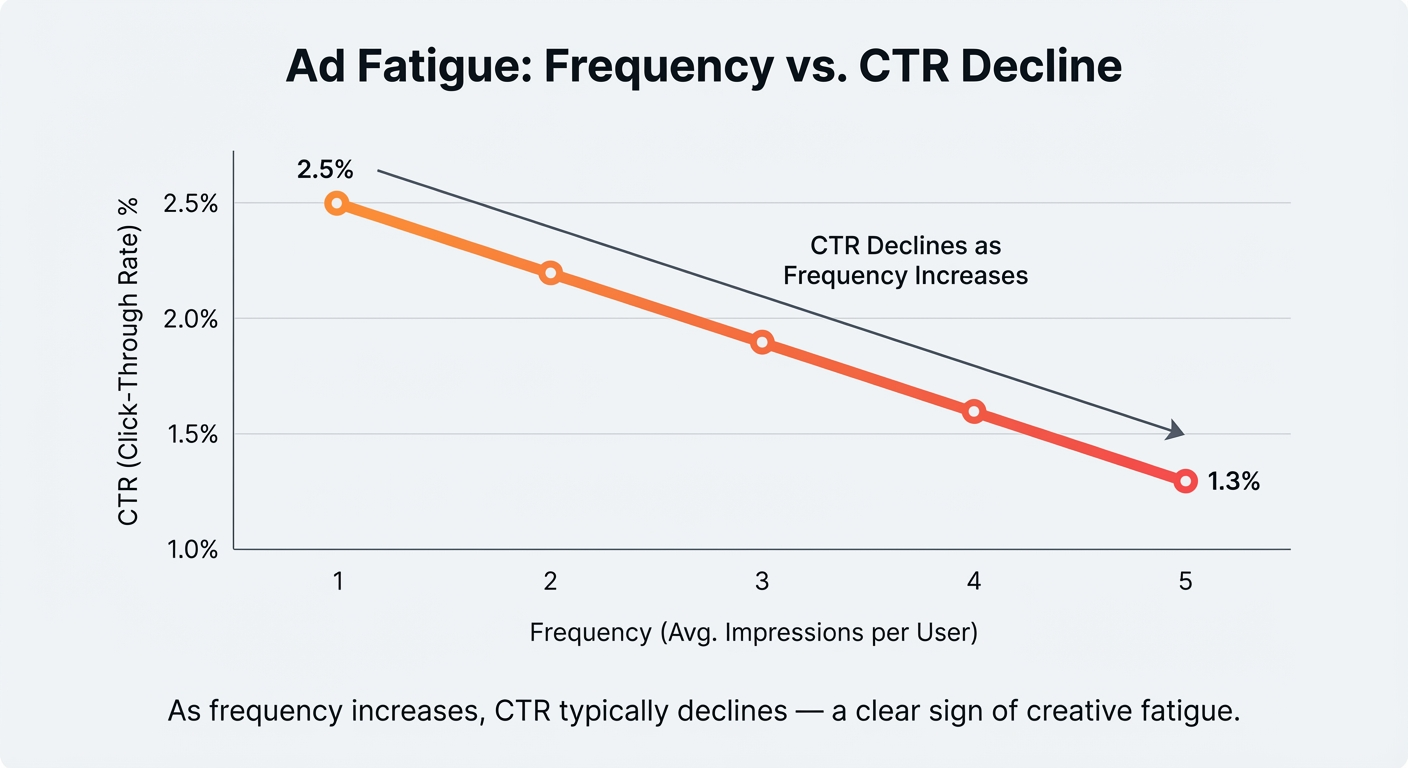 As frequency increases, CTR typically declines — a clear sign of creative fatigue.
9. You don't have enough creative volume or variation
Meta's ad ecosystem in 2025 is brutally simple:
Whoever can ship more good creatives, faster, usually wins.
If your testing pipeline is:
- 1–2 new ads per month
- Same layout, just color tweaks
- Static images only
…you'll struggle as soon as competition increases.
Fix:
-
Build a creative testing rhythm:
- Weekly → 3–5 new concepts
- Monthly → retire losers, scale 1–2 clear winners
-
Vary angles, not just visuals:
- Problem-pain
- Outcome / transformation
- Proof ("X, Y, Z brands use this")
- Mechanism ("how it actually works")
-
Use UGC-style video, Reels, and Stories. People spend big portions of time in short-form placements; your ads should feel native there.
This is where creative analytics shines—more on that later.
10. You're targeting the wrong people (or too many of them)
Since iOS signal loss and Meta's push toward broader targeting, many advertisers either:
- Go way too broad with weak creative (algorithm can't find the right people).
- Or go way too narrow, choking delivery and driving up costs.
Fix:
-
For prospecting, start with:
- Broad + location + age
- 1–2 interest stacks maximum
- Strong creative that clearly calls out the specific niche
-
For retargeting:
- Website visitors
- Video viewers (50%+)
- Engagers
-
Use lookalikes built from:
- High-value customers
- Repeat purchasers
- Qualified leads, not just raw leads
Targeting still matters—but in 2025, creative and pixel/CAPI quality matter more. You can't save a generic offer with laser-targeting anymore.
11. Your audiences are overlapping and competing
Even if your targeting looks clean, your ad sets might be bidding against each other.
Symptoms:
- Multiple ad sets with similar interests/lookalikes
- Some ad sets starve (very low spend), others overspend
- Ads stuck in Learning Limited despite decent budget
Meta tries to avoid serving your ads to the same user from multiple ad sets, which can throttle delivery.
Fix:
- Use the Audience Overlap tool to check overlap.
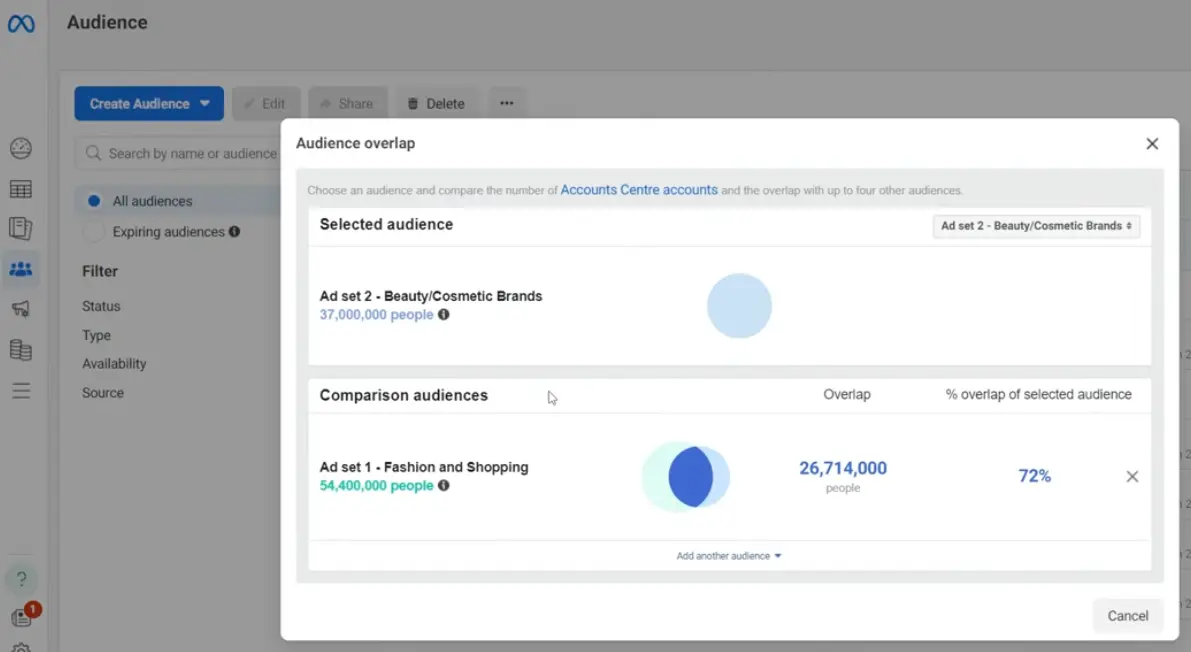 The Audience Overlap tool shows how much your ad sets compete for the same users.
-
Merge overlapping ad sets where it makes sense.
-
Use exclusions:
- Prospecting excludes purchasers + leads
- Retargeting excludes purchasers
-
Consider one campaign → a few well-designed ad sets → multiple creatives instead of dozens of micro-segments.
Less structural noise = more stable learning and cheaper conversions.
12. Your budget, bids, or learning phase are fighting you
A lot of "Facebook ads not working" cases come down to simple math.
Common issues:
- Daily budget is too low to generate 50 events/week for the optimization event.
- CPL > daily budget (e.g. $10/day, $20 per lead) ⇒ you get 1 conversion every 2+ days at best.
- Too many edits resetting the learning phase over and over.
We also know from recent cost data that leads are more expensive than last year—~21% higher on average.
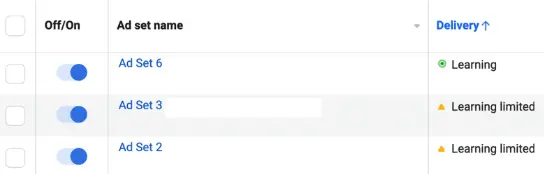 "Learning Limited" means your ad set isn't getting enough conversions to optimize properly.
Fix:
- For conversion campaigns, aim for 10–20x your target CPA as a daily budget per ad set.
- Avoid making major edits (budget, audience, optimization event) more than 1–2x per week.
- Use:
- ABO (ad set budget) for testing
- CBO (campaign budget) once you have clear winners
If you can't afford enough daily budget to hit learning thresholds, switch to a higher-funnel event or switch goal (e.g. optimize for leads instead of sales).
13. Your attribution window hides the impact of Facebook
Sometimes Facebook is working—just not in the way you're measuring.
Common patterns:
- Users see an ad → Google your brand → convert via search.
- People click from Instagram → complete the purchase days later via desktop.
Short attribution windows plus cross-channel journeys make Facebook look under-credited.
Fix:
-
Use 7-day click attribution for most funnels with >1-day decision cycles.
-
In your analytics / CRM, track:
- UTM parameters
- FBCLID where possible
-
Look at blended CAC:
- What happens to overall lead volume / revenue when FB spend is on vs off?
If search/branded conversions drop when you pause Facebook, your campaigns are likely converting indirectly, even if Ads Manager under-reports it.
14. Your vertical, price point, and sales cycle don't match your expectations
"Ads not converting" is sometimes just "this isn't a low-friction impulse purchase."
Signals:
- High-ticket pricing (B2B SaaS, services, coaching).
- Complex buying committees.
- Long onboarding or evaluation periods.
In these cases, expecting a cold Facebook audience to click → buy in one session is unrealistic.
Fix:
-
Define a realistic "conversion" for cold traffic:
- Content download
- Mini audit
- Webinar signup
- Free tool / calculator
-
Then build retargeting around those micro-conversions:
- Case study ads
- Offer ads to people who engaged with a specific asset
The question shifts from "Why aren't my Facebook ads converting?" to "Where in the journey should Facebook play?"
15. Your creative process can't keep up with 2025 competition
Finally, the meta problem behind all the others:
Most teams still create ads like it's 2018, but they're competing in 2025.
Trends that matter:
- Social media ad spend is hitting new peaks; Meta alone is forecast to earn $155B+ in ad revenue in 2024.
- Creative fatigue sets in faster at higher budgets.
If your process is:
- Manually brainstorming every angle
- Waiting on design for weeks
- No systematic way to see which hooks, formats, and visuals actually drive ROAS
…then your ads will slowly fall behind more agile competitors.
Fix:
-
Treat creative as performance inventory:
- Track performance by hook, format, concept, not just ad name.
- Reuse winning angles across formats (static → video, UGC → Reels, etc.).
-
Use tools (yes, including AI) to:
- Generate variant scripts and headlines
- Turn high-performing concepts into multiple visual treatments
-
Set a minimum creative throughput per month and stick to it.
This is exactly where creative analytics platforms become your unfair advantage.
A simple diagnostic checklist (ads not converting)
If your Facebook ads aren't converting right now, run through this in order:
-
Tracking
- Is pixel + CAPI installed and deduplicated correctly?
- Are key events firing on the right URLs?
- Are value parameters set for purchases?
-
Benchmarks
- How does your CTR compare to ~1.7% average?
- How does your CVR compare to ~6–9% depending on funnel?
- Is your CPL/CPA remotely close to sustainable, given your LTV?
-
Offer & Message
- Is the offer crystal clear and differentiated?
- Does ad copy match the landing page headline and visuals?
-
Landing Page & Tech
- Is mobile load time under 3s on 4G?
- Is the flow frictionless (fewest possible steps, no distractions)?
- Do you have basic uptime / synthetic monitoring in place for key funnels?
-
Targeting & Structure
- Are you using appropriate objectives and events?
- Are budgets high enough to exit the learning phase?
- Is audience overlap under control?
-
Creative
- How many net-new concepts have you tested in the last 30 days?
- Are creatives clearly tailored to specific audiences and funnel stages?
- Are you actually rotating winners and killing losers based on data?
Fix what's clearly broken in each layer before you assume Facebook "just doesn't work" for your business.
Where creative analytics and competitor data fit in
Once your fundamentals are solid, the biggest lever for turning "ads not converting" into predictable wins is how you handle creative.
This is where tools like Skaler's creative analytics come into play:
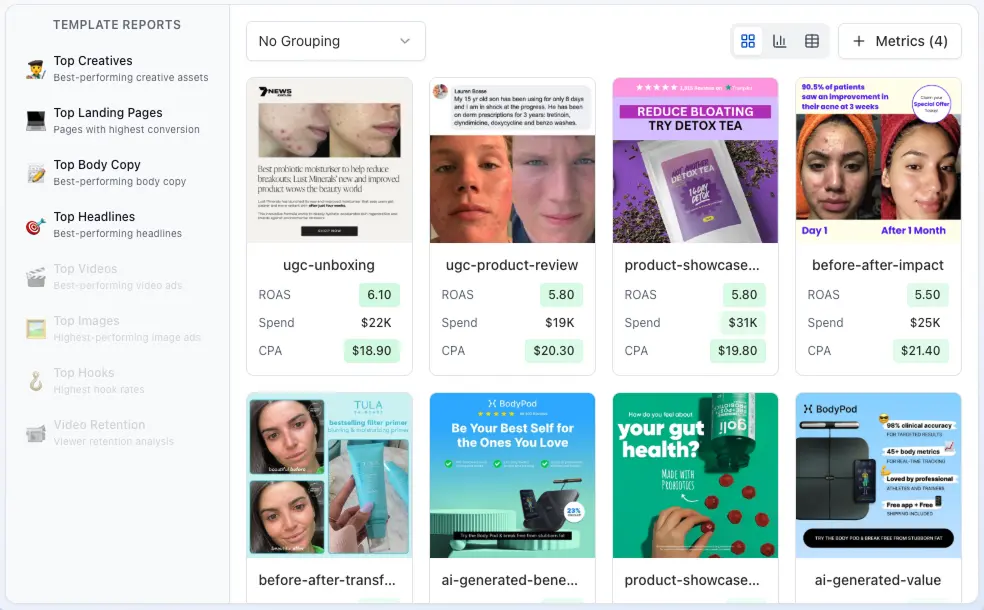 Skaler's Creative Analytics shows which creatives actually drive ROAS — not just clicks.
- See which creatives actually drive ROAS, not just clicks
- Break down winners by:
- Hook
- Format (UGC, product demo, testimonial, etc.)
- Placement
- Compare your performance to competitor patterns:
- What angles do their longest-running ads use?
- How do they talk about price, guarantee, social proof?
Then use that insight to:
- Kill concepts that consistently underperform.
- Scale the ones that beat your account averages.
- Feed your ad production with data-backed briefs, not guesswork.
In 2025, creative + analytics + ops is the stack that separates "we tried Facebook, it didn't work" from "Facebook is one of our most profitable channels."
Bottom line:
"Facebook ads not converting" is almost never a single problem. It's usually a chain of small leaks—tracking, offer, creative, landing page, and tech—all stealing a bit of performance.
Patch those leaks one by one, and your campaigns stop feeling like a gamble and start behaving like a system you can actually scale.
Related Resources
- Top 9 Brands Crushing EU/UK Facebook Ads — Real examples from brands spending €100K+/month
- Static Ads in 2025: 25+ Examples & When to Use Them — Patterns, templates, and a fast testing plan
- Meta Ads Library: Complete 2025 Guide — How to research competitor ads for free
- How to Analyze Ad Performance — A data-driven approach to creative analytics
- 5 Ad Creative Best Practices — Strategies that actually drive conversions
- Best AI Ad Generators in 2025 — Compare tools for creating ads with AI
- Top 10 Performance Marketing Brands in 2025 — See what winning brands are doing
Get Help
Have questions? We're here to help:
- In-app support: Click the help icon in the bottom right
- Email: hello@skaler.app
Ready to fix your Facebook ads? Start free with Skaler and get the creative analytics you need to turn underperforming campaigns into winners.
Related Articles
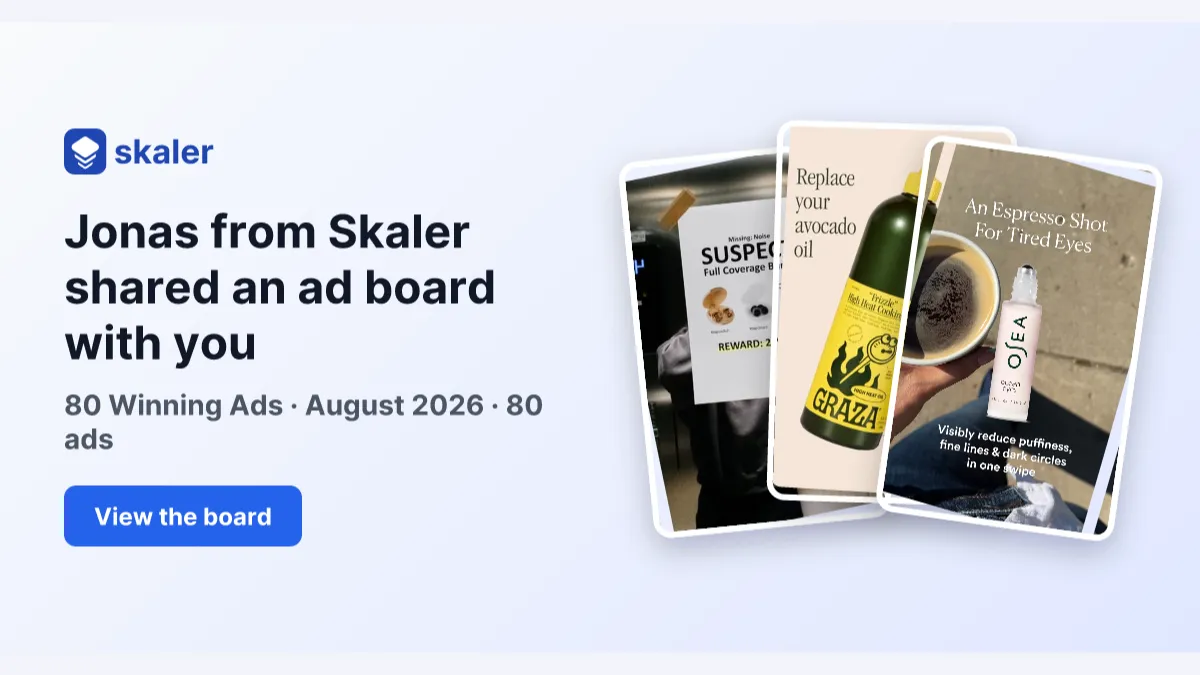
The 80 Most-Saved Meta Ads of August 2026 (Free Swipe File)
We tracked the 80 Meta ads media buyers saved the most this month — from Seed and Loop to AI soap operas running across 9 ad sets. Browse all 80 free, plus the 4 patterns behind them.
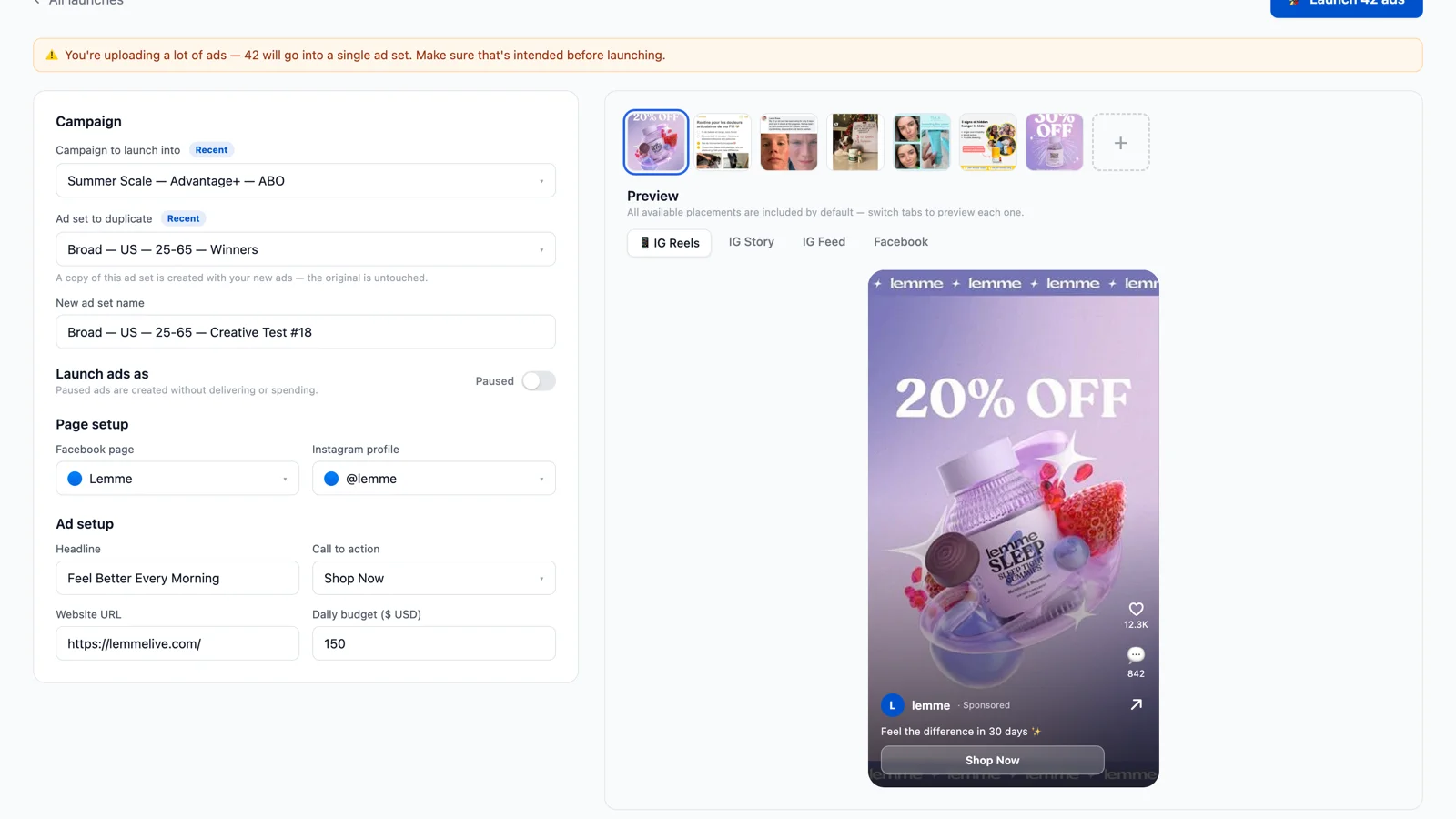
Bulk Ad Launcher for Meta: Launch 100 Facebook Ads in One Click
Skaler's new Bulk Ad Launcher takes you from creatives to live Facebook ads in minutes — drag and drop up to 100 files, duplicate a winning ad set, and launch with copy, budgets, and tracking auto-filled.