
Meta Marketing API: Access, Tokens, Rate Limits & Insights (2026)
How to use the Meta (Facebook) Marketing API: get access, pick the right token, handle rate limits, pull reporting with the Insights API and create ads paused.

 Follow on LinkedIn
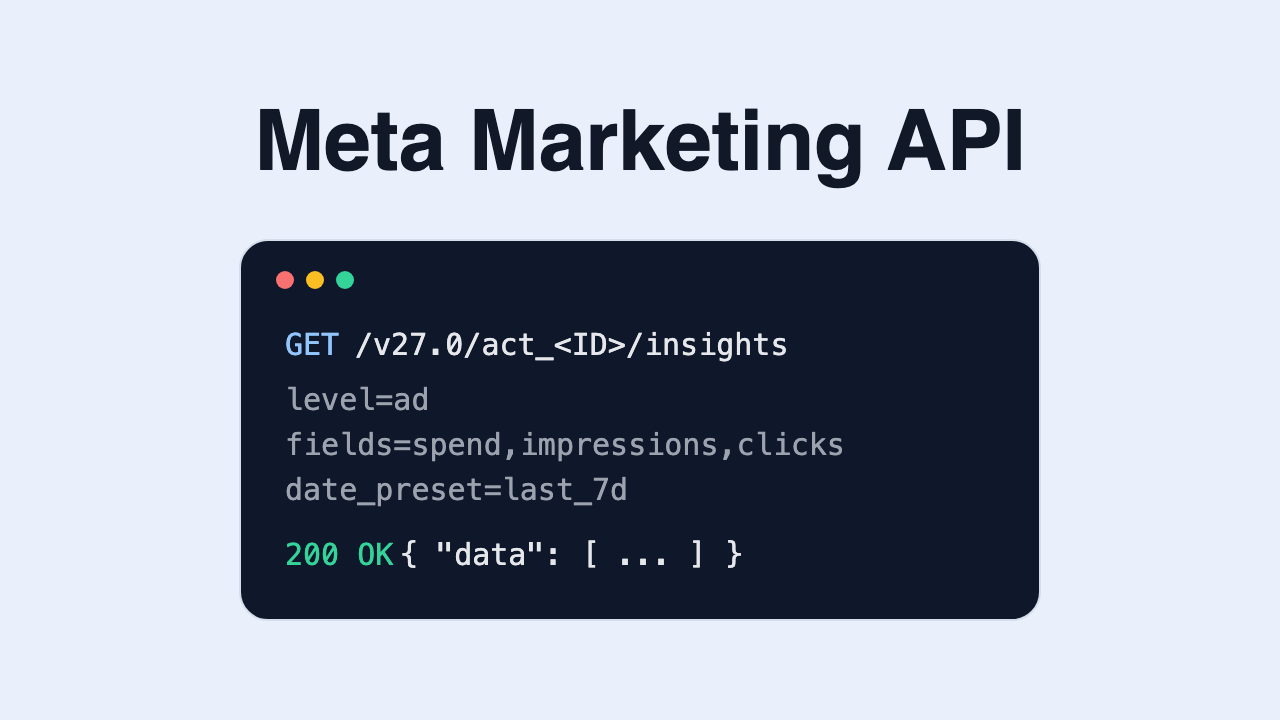
A practical guide to the Meta (Facebook) Marketing API, built on Meta's own developer docs: how to get access, which tokens to use, how the rate limits work, how to pull reporting with the Insights API, and how to create campaigns safely.
TL;DR: The Meta Marketing API is the part of the Graph API that reads and manages Facebook and Instagram ads. You need a Meta developer account, an app with the Marketing API added, an ad account you have a role on, and an access token with ads_read (reporting) or ads_management (creating and editing). New apps start on Limited access, which Meta caps at a much lower rate-limit score than Full access. Reporting goes through the Insights API (/act_<AD_ACCOUNT_ID>/insights), and anything you create through the API can and should start PAUSED. If you only want to ask questions about your ads from Claude or ChatGPT, an MCP server that already holds the API connection is usually faster than building your own app.
"Meta ads API", "Facebook Marketing API" and "Facebook Ads API" all point to the same thing. This guide sticks to what Meta documents and links the source for each claim. Where the docs are silent, we say so.
💡 Looking for competitor ads instead of your own? That's a different API. See our Meta Ad Library API guide. For server-side conversion tracking, see the Conversions API setup guide.
What is the Meta Marketing API?
The Marketing API is a set of Graph API endpoints for your own ad accounts. With it you can:
- Read performance: spend, impressions, clicks, conversions and other metrics through the Insights API, at account, campaign, ad set or ad level.
- Create and edit ads: campaigns, ad sets, ads and ad creatives.
- Manage the plumbing: audiences, product catalogs, business assets and permissions.
It is not a way to see other advertisers' data. Competitor ads come from the public Ad Library and its separate ads_archive endpoint.
Version. Meta versions the Graph API and Marketing API together. Per the Graph API changelog, the latest version at the time of writing is v27.0, released November 4, 2026. Each older version has an "available until" date in that changelog. Pin the version in your request URLs and check the changelog before each upgrade.
How to get Marketing API access
Per Meta's Get Started guide, you need an active ad account and a Meta developer account. The path looks like this:
- Create a Meta developer account at developers.facebook.com with your personal Facebook login.
- Create an app (a business app) and add the Marketing API to it.
- Make sure you have a role on the ad account you want to read or manage, either directly or through Business Manager.
- Get an access token with the permissions you need (next section).
Permissions: ads_read vs ads_management
ads_read: read-only access to ad account data, including insights. Enough for reporting.ads_management: read and write. Needed to create, edit, pause or delete campaigns, ad sets and ads.
Meta's authorization docs draw the key line: if your app only manages your own ad accounts, standard access to ads_read and ads_management is enough. If it manages other people's ad accounts (an agency tool or a SaaS product), you need advanced access, which goes through App Review per permission. Business verification is required if your app accesses sensitive data.
Access tiers: Limited vs Full
Separately from permissions, the Marketing API has its own access tier, per the same authorization docs:
| Tier | How you get it | What it means |
|---|---|---|
| Limited access (default) | Granted automatically when you add the Marketing API to your app | Low rate-limit ceiling; fine for building and testing |
| Full access | Click Upgrade in the App Dashboard once you qualify | Much higher rate limits for production use |
To qualify for Full access, Meta lists two requirements: at least 500 successful Marketing API calls in the last 15 days, and an error rate under 15% across your last 500 calls. In other words, you earn production limits by using the API cleanly on Limited access first.
Access tokens: which one to use
Meta's authentication docs describe three token types you'll meet:
| Token | Lifetime (per Meta) | Use it for |
|---|---|---|
| Short-lived user token | About one to two hours | Testing in the Graph API Explorer |
| Long-lived user token | About 60 days | Scripts you run yourself, refreshed before expiry |
| System user token | Does not expire | Server-to-server jobs (nightly reports, automated launches) |
System users belong to a Business Manager rather than a person, so a token doesn't break when an employee leaves. Even "never expiring" tokens stop working if permissions are revoked, so build in a check that alerts you when calls start returning auth errors.
Never put a token in client-side code or a public repo. Long-lived and system user tokens grant the same access as the user or business that issued them.
Rate limits: how Meta throttles the Marketing API
The Marketing API has its own throttling, separate from general Graph API limits. From Meta's Marketing API rate limiting page:
- Score per ad account. Generally a read call costs 1 point and a write call 3 points. On Full access the maximum score is 9,000; on Limited access (development) it is far lower. Scores decay over time; go over the maximum and the account is blocked for a short period.
- Mutation rate. Creates and edits of campaigns, ad sets and ads have a per-app, per-ad-account requests-per-second cap.
- Concurrent edits. By default, one edit per object every 30 seconds.
- Business Use Case limits. Hourly call budgets per ad account that scale with the number of active ads, with separate budgets for ads management and ads insights.
Watch the headers, not just the errors
Meta returns usage in response headers, so you can slow down before you're blocked (Graph API rate limiting):
X-Business-Use-Case-Usage: per-business call count, CPU time, total time, andestimated_time_to_regain_accesswhen you're throttled.X-Ad-Account-Usage: utilisation of the ad account's score (acc_id_util_pct) and when it resets.X-FB-Ads-Insights-Throttle: app and account utilisation for Insights calls (Insights best practices).
Rate-limit error codes
| Code | Meaning (per Meta's docs) |
|---|---|
4 | App-level limit reached |
17 | User-level limit reached |
613 | Custom limit (subcodes cover mutation QPS, concurrent edits, ad-account limits, too many ad set budget changes per hour) |
80000 | Ads Insights Business Use Case limit |
80004 | Ads Management Business Use Case limit |
When you hit one, back off using the reset time from the headers instead of retrying in a tight loop. Retry loops burn your error rate, which also counts against the Full access requirement.
Pulling reporting with the Insights API
Most people who search for the Meta ads API want numbers out of Ads Manager. That's the Insights API.
Endpoint. GET /act_<AD_ACCOUNT_ID>/insights, or the same /insights edge on a campaign, ad set or ad. Without parameters it returns basic metrics, typically for the past 30 days.
Meta's own minimal example:
curl -G \
  -d "access_token=<ACCESS_TOKEN>" \
  "https://graph.facebook.com/v27.0/<CAMPAIGN_ID>/insights"
A more useful account-level request asks for specific fields at ad level for a fixed window:
curl -G \
  -d "level=ad" \
  -d "fields=ad_name,spend,impressions,clicks,reach,frequency" \
  -d "date_preset=last_7d" \
  -d "access_token=<ACCESS_TOKEN>" \
  "https://graph.facebook.com/v27.0/act_<AD_ACCOUNT_ID>/insights"
Key parameters:
level:account,campaign,adsetorad.fields: the metrics you want. Request only what you need; every field adds work on Meta's side.date_preset(e.g.today,yesterday,last_7d,last_30d,last_90d,maximum) ortime_range={"since":"YYYY-MM-DD","until":"YYYY-MM-DD"}.breakdowns: split results by dimensions such asage,genderor placement.time_increment=1for one row per day.
Limits worth knowing
From Meta's Insights best practices and reference docs:
- 37-month lookback. A
time_rangethat starts more than 37 months ago is rejected. - Reporting time zone. Data is reported in the ad account's time zone.
- Freshness. Insights refresh roughly every 15 minutes and stop changing 28 days after being reported, so numbers for the last few weeks can still move (late conversions).
- Reach with breakdowns. Since June 10, 2025, reach isn't returned for breakdown queries that start more than 13 months ago, except through a small number of async requests per account per day.
Async reports for big pulls
For large accounts, long windows or many breakdowns, use an async job instead of a synchronous GET:
POSTto/<OBJECT_ID>/insightswith the same parameters. Meta returns areport_run_id.- Poll
/<REPORT_RUN_ID>untilasync_statusisJob Completedandasync_percent_completionis 100. GET /<REPORT_RUN_ID>/insightsto page through results.
Meta notes that async jobs can take up to an hour and that a report_run_id expires after 30 days, so don't store it as a long-term reference.
Creating campaigns, ad sets and ads
Meta's ad structure has three levels plus the creative (Marketing API overview):
- Campaign: the objective.
- Ad set: budget, schedule, bidding, optimisation and audience.
- Ad: links an ad set to an ad creative (the image or video, copy and link). Meta's docs note creatives can't be changed once created; you create a new one instead.
The create endpoints all hang off the ad account:
| Object | Endpoint |
|---|---|
| Campaign | POST /act_<AD_ACCOUNT_ID>/campaigns |
| Ad set | POST /act_<AD_ACCOUNT_ID>/adsets |
| Ad | POST /act_<AD_ACCOUNT_ID>/ads |
Always create in PAUSED. Per the campaigns reference, only ACTIVE and PAUSED are valid statuses at creation, and Meta's ads reference recommends PAUSED during testing "so as to not incur accidental spend". Review the result in Ads Manager, then switch it on.
A few rules that trip people up:
- Campaigns require
special_ad_categories(pass an empty list if none apply). - An ad set needs a
daily_budgetorlifetime_budgetgreater than 0, unless the campaign controls the budget. - An ad needs a
name, acreativeand anadset_id. - Pausing a campaign pauses its active children; their effective status becomes
CAMPAIGN_PAUSED.
Common errors and fixes
| Symptom | Likely cause | Fix |
|---|---|---|
(#200) permission errors | Token lacks ads_read/ads_management, or the user has no role on the ad account | Re-issue the token with the right scope; check the ad account role |
| Calls work for you but not for clients' accounts | Standard access only covers your own accounts | Apply for advanced access through App Review |
Error 17, 613, 80000, 80004 | Rate limits | Back off using the usage headers; batch and cache reads |
| Token suddenly invalid | Expired user token, password change or revoked permission | Use a system user token for automation; alert on auth failures |
| Insights request times out | Window, level or breakdowns too large for a sync call | Switch to an async report job |
| Last week's numbers changed | Late-attributed conversions (data settles over 28 days) | Re-pull recent days instead of caching them as final |
Build it yourself, or use a tool?
Building directly on the Marketing API makes sense when you need custom pipelines: loading spend into a warehouse, a bespoke reporting app, or automation your team owns. Budget for app setup, token management, rate-limit handling and the version upgrades Meta ships several times a year.
If the goal is to answer questions about creative performance, you don't need your own app. Skaler shows which Meta ads are winning and why — hooks, angles, formats, ROAS — plus competitor ad intel and bulk launching. It works in a dashboard or from Claude, ChatGPT and other MCP clients through the Skaler MCP server, and new launches are paused by default. Plans start from $83/mo billed yearly. To connect an AI assistant, see how to connect Meta Ads MCP to Claude or the Meta Ads MCP page.
Frequently Asked Questions
Is the Meta Marketing API free? Yes. Meta doesn't charge for API calls. You pay only for the ads you run. Access is limited by permissions, access tiers and rate limits, not by price.
What's the difference between the Marketing API and the Ad Library API?
The Marketing API works on ad accounts you have a role on: your own performance data and campaign management. The Ad Library API (ads_archive) is read-only access to public ads in Meta's Ad Library, and for commercial ads it mostly covers ads delivered in the EU and UK.
Do I need App Review to use the Marketing API?
Not for your own ad accounts. Per Meta's authorization docs, standard access to ads_read and ads_management is enough when your app manages only your ad accounts. You need advanced access, which requires App Review, to manage other people's ad accounts.
How do I get Full access to the Marketing API? Make at least 500 successful Marketing API calls in 15 days with an error rate under 15% over your last 500 calls, then click Upgrade in the App Dashboard.
Which access token should I use for automated reports? A system user token from Business Manager. Per Meta's docs it doesn't expire, and it isn't tied to one employee's personal account.
How far back can the Insights API go? 37 months. Requests whose start date is older than that are rejected.
Can I create ads through the API without them going live?
Yes. Create campaigns, ad sets and ads with status=PAUSED. Meta recommends this during testing to avoid accidental spend.
The takeaway
For your own ad accounts, the Marketing API is free and needs no App Review: a developer app, the right permission (ads_read to report, ads_management to build), and a system user token for anything automated. Expect to start on Limited access and earn Full access with clean usage, watch the usage headers instead of waiting for error 17, use async jobs for heavy Insights pulls, and create everything paused.
Sources
- Marketing API: Get Started (Meta for Developers)
- Authorization (permissions, access levels, access tiers) (Meta for Developers)
- Authentication (access tokens) (Meta for Developers)
- System users (Meta for Developers)
- Marketing API rate limiting (Meta for Developers)
- Graph API rate limiting (Meta for Developers)
- Insights API and Insights best practices (Meta for Developers)
- Ad account campaigns, ad sets and ads reference (Meta for Developers)
- Graph API changelog (Meta for Developers)
Related Resources
Related Articles
Meta Partnership Ads: Setup, Ad Codes & Permissions (2026)
How Meta partnership ads work: ad codes vs account-level permission, Ads Manager setup, placements, creator reporting, common errors and when to use them.
Meta Ad Library API: Access, Fields & Limits (2026)
How the Meta (Facebook) Ad Library API works: access steps, ads_archive fields, a working curl request, error codes, coverage limits, and scraping vs API.